Programming Overview
You can perform powerful data manipulation and analysis interactively using Igor's dialogs and the command line. However, if you want to automate common tasks or create custom data analysis features, then you need to use procedures.
You can write procedures yourself, use procedures supplied by WaveMetrics, or find someone else who has written procedures you can use. Even if you don't write procedures from scratch, it is useful to know enough about Igor programming to be able to understand code written by others.
Programming in Igor entails creating procedures by entering text in a procedure window. After entering a procedure, you can execute it via the command line, by choosing an item from a menu, or using a button in a control panel.
The bulk of the text in a procedure window falls into one of the following categories:
-
Pragmas, which send instructions from the programmer to the Igor compiler
-
Include statements, which open other procedure files
-
Constants, which define symbols used in functions
-
Structure definitions, which can be used in functions
-
Proc Pictures, which define images used in control panels, graphs, and layouts
-
Menu definitions, which add menu items or entire menus to Igor
-
Functions - compiled code which is used for nearly all Igor programming
-
Macros - interpreted code which, for the most part, is obsolete
Functions are written in Igor's programming language. Like conventional procedural languages such as C or Pascal, Igor's language includes:
-
Data storage elements (variables, strings, waves)
-
Assignment statements
-
Flow control (conditionals and loops)
-
Calls to built-in and external operations and functions
-
Ability to define and call subroutines
Igor programming is easier than conventional programming because it is much more interactive -- you can write a routine and test it right away. It is designed for interactive use within Igor rather than for creating stand-alone programs.
Names in Programming
Functions, constants, variables, structures and all other programming entities have names. Names used in programming must follow the standard Igor naming conventions.
Names can consist of up to 255 characters. Only ASCII characters are allowed. The first character must be alphabetic while the remaining characters can include alphabetic and numeric characters and the underscore character. Names in Igor are case insensitive.
Prior to Igor Pro 8.00, names used in programming were limited to 31 bytes. If you use long names, your procedures will require Igor Pro 8.00 or later.
The names of external operations and external functions are an exception. They are limited to 31 bytes.
Organizing Procedures
Procedures can be stored in the built-in Procedure window or in separate auxiliary procedure files. See Procedure Windows for an explanation of how to edit the Procedure window and how to create auxiliary procedure files.
At first, you will find it convenient to do all of your Igor programming in the built-in Procedure window. In the long run, however, it will be useful to organize your procedures into categories so that you can easily find and access general-purpose procedures and keep them separate from special-case procedures.
The following sections show how we categorize procedures and how we store and access the different categories.
Experiment Procedures
These are specific to a single Igor experiment.
They include procedures you write as well as window recreation macros created automatically by Igor when you close a graph, table, layout, control panel, or Gizmo plot.
Usually experiment procedures are stored in the built-in Procedure window. You can optionally create additional procedure windows in a particular experiment but this is usually not needed.
You create an experiment procedure by typing in the built-in Procedure window.
Utility Procedures
These are general-purpose and potentially useful for any Igor experiment.
WaveMetrics supplies utility procedures in the WaveMetrics Procedures folder. You can also write your own procedures or get them from colleagues.
Utility procedure files that you or other Igor users create should be stored in your own folder, in the Igor Pro User Files folder (see Igor Pro User Files for details) or at another location of your choosing. Place a shortcut for your folder in "Igor Pro User Files/User Procedures".
Use an include statement to use a WaveMetrics or user utility procedure file.
Global Procedures
These are procedures that you want to be available from all experiments.
Store your global procedure files in "Igor Pro User Files/Igor Procedures" (see Igor Pro User Files for details). You can also store them in another folder of your choice and place a shortcut for your folder in "Igor Pro User Files/Igor Procedures".
Igor automatically opens any procedure file in "Igor Pro Folder/Igor Procedures" and "Igor Pro User Files/Igor Procedures" and subfolders or referenced by a shortcut in those folders, and leaves it open in all experiments.
Following this scheme, you will know where to put procedure files that you get from colleagues and where to look for them when you need them.
Utility and global procedures should be general-purpose so that they can be used from any experiment. Thus, they should not rely on specific waves, global variables, global strings, specific windows or any other objects specific to a particular experiment. See Writing General-Purpose Procedures for further guidelines.
After they are debugged and thoroughly tested, you may want to share your procedures with other Igor users via IgorExchange.
WaveMetrics Procedure Files
WaveMetrics has created a large number of utility procedure files that you can use as building blocks. These files are stored in the WaveMetrics Procedures folder. They are described in the WM Procedures Index help file. Click WaveMetrics Procedures to open it.
You access WaveMetrics procedure files using include statements (see The Include Statement).
Using the Igor Help Browser, you can search the WaveMetrics Procedures folder to find examples of particular programming techniques.
Macros and Functions
There are two kinds of Igor procedures: macros and functions. They use similar syntax. The main difference between them is that Igor compiles user functions but interprets macros.
Because functions are compiled, they are dramatically faster than macros. Compilation also allows Igor to detect errors in functions when you write the function, whereas errors in macros are detected only when they are executed.
Functions provide many programming features that are not available in macros.
Macros are a legacy of Igor's early days. With rare exceptions, all new programming should use functions, not macros.
Scanning and Compiling Procedures
When you modify text in a procedure window, Igor must process it before you can execute any procedures. There are two parts to the processing: scanning and function compilation. In the scanning step, Igor finds out what procedures exist in the window. In the compilation step, Igor's function compiler converts the function text into low-level instructions for later execution.
For the sake of brevity, we use the term "compile" to mean "scan and compile" except when we are specifically pointing out the distinction between these two steps.
You can explicitly tell Igor to compile the procedures using the Compile button in the Procedure window or the Compile item in the Macros menu.
By default, Igor automatically compiles the procedure text at appropriate times. For example, if you type in the Procedure window and then hide it by clicking in the close button, Igor will automatically compile.
If you have many procedures that take long to compile, you may want to turn auto-compiling off using the Macros menu. When the Auto-compile menu item in the Macros menu is deselected, Igor compiles only when you explicitly request it. Igor will still scan the procedures when it needs to know what macros and functions exist.
Indentation Conventions
We use indentation to indicate the structure of a procedure.
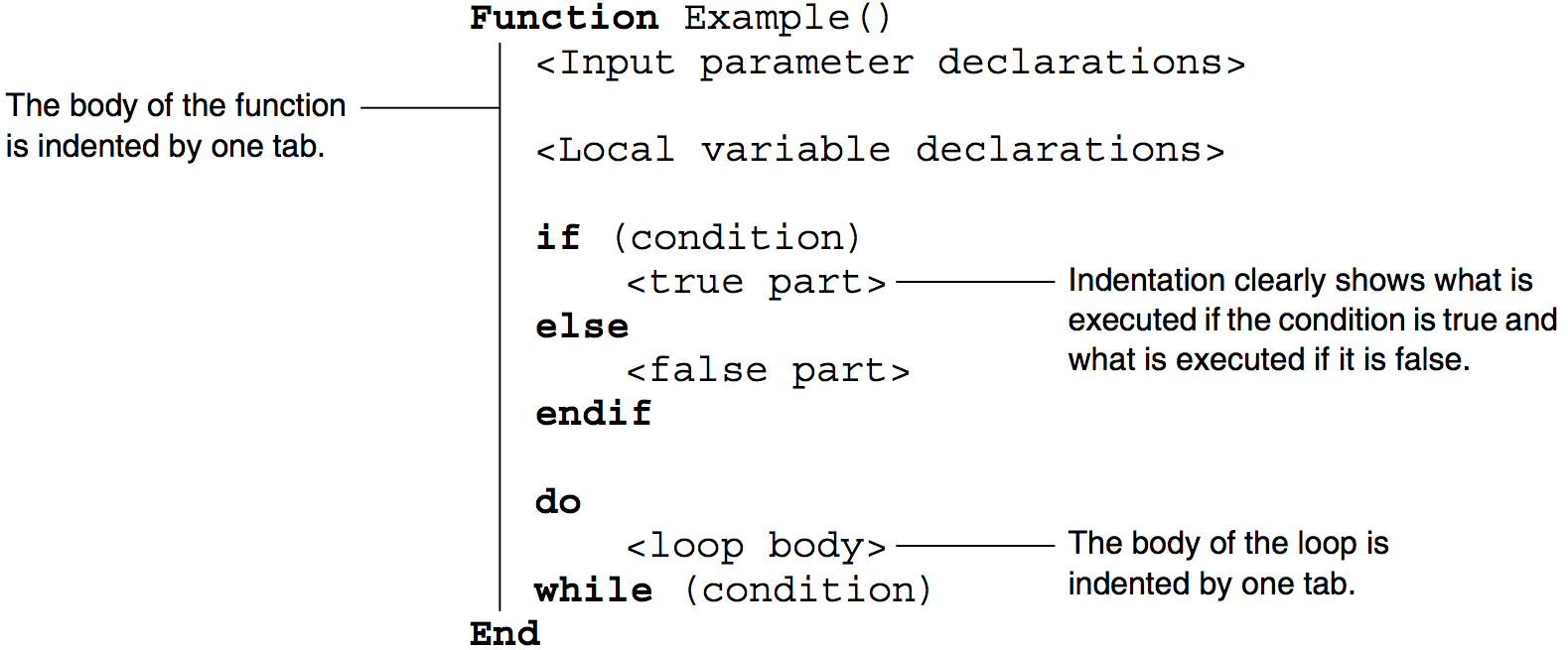
The structural keywords, shown in bold here, control the flow of the procedure. The purpose of the indentation is to make the structure of the procedure apparent by showing which lines are within which structural keywords. Matching keywords are at the same level of indentation and all lines within those keywords are indented by one tab.
The Edit menu contains aids for maintaining or adjusting indentation. You can select multiple lines and choose Indent Left or Indent Right. You can have Igor automatically adjust the indentation of a procedure by selecting the whole procedure or a subset and then choosing Adjust Indentation.
Igor does not require that you use indentation but we recommend it for readability.
User-Defined Functions
Most of Igor programming consists of writing user-defined functions.
A function has zero or more parameters. You can use local variables to store intermediate results. The function body consists of Igor operations, assignment statements, flow control statements, and calls to other functions.
A function can return a numeric, string, wave reference or data folder reference result. It can also have a side-effect, such as creating a wave or creating a graph.
Before we dive into the technical details, here is an informal look at some simple examples.
Function Hypotenuse(side1, side2)
	Variable side1, side2
	Variable hyp

	hyp = sqrt(side1^2 + side2^2)

	return hyp
End
The Hypotenuse function takes two numeric parameters and returns a numeric result. "hyp" is a local variable and sqrt is a built-in function. You could test Hypotenuse by pasting it into the Procedure window and executing the following statement in the command line:
Print Hypotenuse(3, 4)
Now let's look at a function that deals with text strings.
Function/S FirstStr(str1, str2)
	String str1, str2
	String result

	if (CmpStr(str1,str2) < 0)
		result = str1
	else
		result = str2
	endif

	return result
End
The FirstStr function takes two string parameters and returns the string that is first in alphabetical order. CmpStr is a built-in function. You could test FirstStr by pasting it into the Procedure window and executing the following statement in the command line:
Print FirstStr("ABC", "BCD")
Now a function that deals with waves.
Function CreateRatioOfWaves(w1, w2, nameOfOutputWave)
	WAVE w1, w2
	String nameOfOutputWave

	Duplicate/O w1, $nameOfOutputWave
	WAVE wOut = $nameOfOutputWave
	wOut = w1/w2
End
The CreateRatioOfWaves function takes two wave parameters and a string parameter. The string is the name to use for a new wave, created by duplicating one of the input waves. The "WAVE wOut" statement creates a wave reference for use in the following assignment statement. This function has no direct result (no return statement) but has the side-effect of creating a new wave.
Here are some commands to test CreateRatioOfWaves:
Make test1 = {1, 2, 3}, test2 = {2, 3, 4}
CreateRatioOfWaves(test1, test2, "ratio")
Edit test1, test2, ratio
Function Syntax
The basic syntax of a function is:
Function <Name> ( <Parameter list>  [<Optional Parameters>] ) [:<Subtype>]
	<Parameter declarations>
	<Local variable declarations>
	<Body code>

	<Return statement>
End
Here is an example:
Function Hypotenuse(side1, side2)
	Variable side1, side2					// Parameter declaration

	Variable hyp								// Local variable declaration

	hyp = sqrt(side1^2 + side2^2)			// Body code

	return hyp									// Return statement
End
You could test this function from the command line using one of these commands:
Print Hypotenuse(3,4)
Variable/G result = Hypotenuse(3,4); Print result
As shown above, the function returns a real, numeric result. The Function keyword can be followed by a flag that specifies a different result type.
| Flag | Return Value Type |
|---|---|
| /D | Double precision number (obsolete) |
| /C | Complex number |
| /S | String |
| /WAVE | Wave reference |
| /DF | Data folder reference |
The /D flag is obsolete because all calculations are now performed in double precision. However, it is still permitted.
The Function Name
The names of functions must follow the standard Igor naming conventions. Names can consist of up to 255 characters. Only ASCII characters are allowed. The first character must be alphabetic while the remaining characters can include alphabetic and numeric characters and the underscore character. Names must not conflict with the names of other Igor objects, functions or operations. Names in Igor are case insensitive.
Prior to Igor Pro 8.00, function names were limited to 31 bytes. If you use long function names, your procedures will require Igor Pro 8.00 or later.
The Procedure Subtype
You can identify procedures designed for specific purposes by using a subtype. Here is an example:
Function ButtonProc(ctrlName) : ButtonControl
	String ctrlName
	Beep
End
Here, " : ButtonControl" tells Igor that this function is intended to be called when a user-defined button control is clicked. Because of the subtype, Igor will include this function in the menu of procedures that appears in the Button Control dialog which you used to create buttons. When Igor automatically generates a procedure it generates the appropriate subtype. See Procedure Subtypes for details.
The Parameter List and Parameter Declarations
The parameter list specifies the name for each input parameter. There is no limit on the number of parameters.
All parameters must be declared immediately after the function declaration. In Igor Pro 7 or later you can use inline parameters, described below.
The parameter declaration declares the type of each parameter using one of these keywords:
| Variable | Numeric parameter | |
| Variable/C | Complex numeric parameter | |
| String | String parameter | |
| Wave | Wave reference parameter | |
| Wave/C | Complex wave reference parameter | |
| Wave/T | Text wave reference parameter | |
| DFREF | Data folder reference parameter | |
| FUNCREF | Function reference parameter | |
| STRUCT | Structure reference parameter | |
| int | Signed integer - requires Igor 7 or later | |
| int64 | Signed 64-bit integer - requires Igor 7 or later | |
| uint64 | Unsigned 64-bit integer - requires Igor 7 or later | |
| double | Numeric parameter - requires Igor 7 or later | |
| complex | Complex numeric parameter - requires Igor 7 or later | |
int is 32 bits in IGOR32 and 64 bits in IGOR64.
double is a synonym for Variable and complex is a synonym for Variable/C.
WAVE/C tells the Igor compiler that the referenced wave is complex.
WAVE/T tells the Igor compiler that the referenced wave is a text wave.
Variable and string parameters are usually passed to a subroutine by value but can also be passed by reference. For an explanation of these terms, see How Parameters Work.
Integer Parameters
In Igor Pro 7 or later you can use these integer types for parameters and local variables in user-defined functions:
| int | 32-bit integer in IGOR32, 64-bit integer in IGOR64 | |
| int64 | 64-bit signed integer | |
| uint64 | 64-bit unsigned integer | |
int is a generic signed integer that you can use for wave indexing or general use. It provides a speed improvement over Variable or double in most cases.
Signed int64 and unsigned uint64 are for special purposes where you need explicit access to bits. You can also use them in structures.
Optional Parameters
Following the list of required function input parameters, you can also specify a list of optional input parameters by enclosing the parameter names in brackets. You can supply any number of optional parameter values when calling the function by using the ParamName =Value syntax. Optional parameters may be of any valid data type. There is no limit on the number of parameters.
All optional parameters must be declared immediately after the function declaration. As with all other variables, optional parameters are initialized to zero. You must use the ParamIsDefault function to determine if a particular optional parameter was supplied in the function call.
See Using Optional Parameters for an example.
Inline Parameters
In Igor Pro 7 or later you can declare user-defined functions parameters inline. This means that the parameter types and parameter names are declared in the same statement as the function name:
Function Example(Variable a, [ Variable b, double c ])
	Print a,b,c
End
or, equivalently:
Function Example2(
		Variable a,		// The comma is optional
		[
			Variable b,
			double c
		]
	)
	Print a,b,c
End
Local Variable Declarations
The parameter declarations are followed by the local variable declarations if the procedure uses local variables. Local variables exist only during the execution of the procedure. They are declared using one of these keywords:
| Variable | Numeric variable | |
| Variable/C | Complex numeric variable | |
| String | String variable | |
| NVAR | Global numeric variable reference | |
| NVAR/C | Global complex numeric variable reference | |
| SVAR | Global string variable reference | |
| Wave | Wave reference | |
| Wave | Wave reference | |
| Wave/C | Complex wave reference | |
| Wave/T | Text wave reference | |
| DFREF | Data folder reference | |
| FUNCREF | Function reference | |
| STRUCT | Structure | |
| int | Signed integer - requires Igor 7 or later | |
| int64 | Signed 64-bit integer - requires or later | |
| uint64 | Unsigned 64-bit integer - requires Igor 7 or later | |
| double | Numeric variable - requires Igor 7 or later | |
| complex | Complex numeric variable - requires Igor 7 or later | |
double is a synonym for Variable and complex is a synonym for Variable/C.
Numeric and string local variables can optionally be initialized. For example:
Function Example(p1)
	Variable p1

	// Here are the local variables
	Variable v1, v2
	Variable v3 = 0
	Variable/C cv1 = cmplx(0,0)
	String s1="test", s2="test2"

	<Body code>
End
If you do not supply explicit initialization, Igor automatically initializes local numeric variables with the value zero. Local string variables are initialized with a null value such that, if you try to use the string before you store a value in it, Igor reports an error.
Inititialization of other local variable types is discussed below under Wave References, Data Folder References, Function References, and Structures In Functions.
The name of a local variable is allowed to conflict with other names in Igor, but they must be unique within the function. If you create a local variable named "sin", for example, then you will be unable to use Igor's built-in sin function within the function.
You can declare local variables anywhere in the function after the parameter declarations.
Function Body Code
This table shows what can appear in body code of a function.
| What | Allowed in Functions? | Comment | |
|---|---|---|---|
| Assignment statements | Yes | Includes wave, variable and string assignments. | |
| Built-in operations | Yes, with a few exceptions. | See Operations in Functions for exceptions. | |
| Calls to user functions | Yes | ||
| Calls to macros | No | ||
| External functions | Yes | ||
| External operations | Yes, with exceptions. | ||
Statements are limited to 2500 bytes per line except for assignment statements which, in Igor Pro 7 or later, can be continued on subsequent lines.
Line Continuation
In user-defined functions in Igor Pro 7 or later, you can use arbitrarily long expressions by including a line continuation character at the very end of a line. The line continuation character is backslash. For example:
Function Example1(double v1)
	return v1 + \
	2
End
In Igor 10 or later, line continuation is supported nearly everywhere in both functions and macros. Here is a simple example using a string expression:
Function/S Example2(string s1)
	return s1 + \
		" " + \
		"there"
End
Line continuation does not work when splitting a name over a line break. For example, this generates a compile error:
Function Example3()
	Variable v1= MyModule#inMyModule() // the normal syntax
	// splitting a name isn't allowed: next line won't compile
	Variable v2 = My\
	              Module#        \
                  inMyModule()
End
Compound name components can be on successive lines, though:
Macro callStaticFunction()
	Variable v1= MyModule#inMyModule() // the normal syntax
	// demonstrate a compound name with line continuation
	Variable v2 = MyModule\
	              #        \
                  inMyModule()
    Print v1,v2
EndMacro
In Igor 10, line continuation also works at the end of a comment line:
Function [WAVE w] // output wave \
	Example4(String name,      // input: created wave's name \
			Variable length,     // input: # of points \
			Variable avg,        // input: mean value  \
			Variable noise)      // input: gnoise value
	Make/O/N=(length) $name = avg+gnoise(noise)
	WAVE w= $name
End

Function callExample4()
	[WAVE w] = Example4("myWave",20,5,2)
	Display w
End
The Return Statement
A return statement often appears at the end of a function, but it can appear anywhere in the function body. You can also have more than one return statement.
The return statement stops execution immediately and returns a value to the calling function. The type of the returned value must agree with the type declared in the function declaration.
If there is no return statement, or if a function ends without hitting a return statement, then the function returns the value NaN (Not a Number) for numeric functions and null for other types of functions. If the calling function attempts to use the null value, Igor reports an error.
Multiple Return Syntax
In Igor Pro 8 or later, you can create a function with multiple return values using this syntax:
Function [ <output parameter list> ] <function name> ( <input parameter list> )
The square brackets are part of the syntax.
Both the output parameter list and the input parameter list must be specifed using inline syntax (see Inline Parameters). The entire function declaration must appear on one line.
You can return all output values using one return statement:
return [ <value list> ]
For example:
Function [ Variable v, String s ] Subroutine( Variable a )
	return [1+a, "hello"]
End
Function CallingRoutine()
	Variable v1
	String s1
	[v1, s1] = Subroutine(10)
	Print v1, s1
End
In Igor Pro 9.00 and later, you can declare the return variables in the destination parameter list like this:
Function CallingRoutine()
	[Variable v1, String s1] = Subroutine(10)
	Print v1, s1
End
You can set the return values individually without using a return statement like this:
Function [ Variable v, String s ] Subroutine( Variable a )
	v = 1 + a
	s = "hello"
End
The output parameter list can include numeric and string variables as well as structures. Any type that can be used as a pass-by-reference parameter (see Pass-By-Reference) can be used in the output parameter list.
Multiple Return Syntax Example
This example illustrates using structure and WAVE references as output parameters:
Structure DemoStruct
	Variable num
	String str
EndStructure

Function [STRUCT DemoStruct sOut, WAVE/T wOut] Subroutine(Variable v1)
	STRUCT DemoStruct s
	s.num = 4 + v1
	s.str = "from Subroutine"

	Make/O/T tw = {"text wave point 0","text wave point 1"}

	return [ s, tw ]
End

Function CallingRoutine()
	STRUCT DemoStruct s
	WAVE/T w
	[ s, w ] = Subroutine(2)
	Print s, w
End

Executing CallingRoutine gives:
STRUCT DemoStruct
 num: 6
 str: from Subroutine
tw[0]= {"text wave point 0","text wave point 1"}
In Igor Pro 9.00 and later, the CallingRoutine can be rewritten to declare the return variables in the destination parameter list:
Function CallingRoutine()
	[ STRUCT DemoStruct s, WAVE/T w ] = Subroutine(2)
	Print s, w
End
At runtime, WAVE variables declared in the destination list do not perform the usual time consuming lookup (trying to find a wave named w in this case.) They act as if WAVE/ZZ was specified. See WAVE for details.
Using Multiple Return Syntax Variables As Input and Output
Igor initializes local numeric variables to 0, local string variables to NULL, and local WAVE variables to NULL. If you use a local variable as both and input and an output to a function that uses multiple return syntax, you should assign a value to the variable before using it:
Function [String str] AppendToString()
	str += "DEF"
End
Function CallingRoutineBad()
	String str                       // Initialized by Igor to NULL
	[str] = AppendToString()         // Error: Attempt to use a NULL string
	Print str
End
Function CallingRoutineGood()
	String str = "ABC"               // Explicitly initialized
	[str] = AppendToString()
	Print str                        // Prints "ABCDEF"
End
CallingRoutineBad passes a NULL string to AppendToString which treats it as both an input and an output. AppendToString attempts to append to the NULL string causing an "attempt to use NULL string" error.
Here is a more subtle way to make this mistake:
Function CallingRoutineBad()
	[String str] = AppendToString()  // Error: Attempt to use a NULL string
	Print str
End
Again, str is NULL and this results in an "attempt to use NULL string" error.
The same principle applies to local numeric variables and to WAVE references. If you are passing them to an MRS function that uses them as both an input and an output, you must initialize them in the calling function.
Expression Evaluation
An expression is a combination of literal values, variable references, wave references, function calls, parentheses and operators. Expressions appear on the right-hand side of assignment statements and as parameters in commands. For example:
Variable v = ((123 + someVariable) * someWave[3]) / SomeFunction()
In most cases Igor evaluates expressions using double-precision floating point. However, if the destination is an integer type, then Igor uses integer calculations.
Integer Expressions
Prior to Igor Pro 7, all calculations were performed in double-precision floating point. Double-precision can represent integers of up to 53 bits precisely. Integers larger than 53 bits are represented approximately in double-precision.
Igor Pro 7 or later can perform integer calculations instead of floating point. You trigger this by assigning a value to a local variable declared using the integer types int, int64 and uint64. Calculations are done using 32 bits or 64 bits depending on the type of the integer.
When an integer type variable is the destination in an expression in a function, the right-hand side is compiled using integer math. Integer math avoids the limitation of 53 bits for double precision and may also provide a speed advantage, but care must be taken to avoid surprising results, usually due to integer truncation during division.
If you use a function such as sin that is inherently floating point, it is calculated as a double and then converted to an integer. You should avoid using anything that causes a double-to-integer conversion when the destination is a 64-bit integer.
This example shows various ways to use integer expressions:
Function Example()
	int a = 0x101			// 0x introduces a hexadecimal literal number
	int b = a<<2
	int c = b & 0x400
	printf "a=%x, b=%x, c=%x\r", a, b, c
End
This prints
a=101, b=404, c=400
To set bits in an integer, use the left-shift operator, <<. For example to set bit 60 in a 64-bit integer, use 1<<60. This is the integer equivalent of 2^60, but you cannot use ^ because exponentiation is not supported in integer expressions.
To print all the bits in a 64-bit integer, use Printf with the %x or %d conversion specification. You can also use a Print command as long as the compiler can clearly see the number is an integer from the first symbol. For example:
Function Example2()
	int64 i = 1<<60			// 1152921504606846976 (decimal), 1000000000000000 (hex)
	Printf "i = %0.16X\r", i
	Printf "i = %d\r", i
	Print "i =", i
	Print "i =", 0+i			// First symbol is not an integer variable or wave
End
This prints:
  i = 1000000000000000
  i = 1152921504606846976
  i = 1152921504606846976
  i = 1.15292e+18
Integer Expression Surprises
Because integer expressions are evaluated using integers, you must take care in using them. Beware that assigning fractional values truncate to the nearest integer, and values less than 1 become zero.
Function BadExamples()
	int i = 5
	int idiv2 = i / 2
	Print "integer 5/2 =", idiv2

	// Note: integer divide by zero returns max 64 bit signed int in Igor 10, 999 in Igor 7-9
	// Max signed 64-bit int is 9,223,372,036,854,775,807
	int iTimes4 = i / 0.25	// this would work if iTimes4 and i were floating point
	Print "integer 5/0.25 =", iTimes4	// 0.25 is considered a zero integer

	Variable fpi = 5
	iTimes4 =  fpi / 0.25	// int expression compiled because iTimes4 is integer destination
	Print "integer LHS 5.0/0.25 =", iTimes4

	Variable dTimes4 = fpi / 0.25	// 5/0.25 = 5 * 4, floating point expression compiled
	Print "floating point LHS 5/0.25 =", dTimes4
End
This prints:
  integer 5/2 =  2
  integer 5/0.25 =  9223372036854775807
  integer LHS 5.0/0.25 =  9223372036854775807
  floating point LHS 5/0.25 =  20
Integer Expressions in Wave Assignment Statements
When compiling a wave assignment statement, the right-hand expression is compiled as 64-bit integer if the compiler knows that the destination wave is 64-bit integer. Otherwise, the expression is compiled as double. For example:
Function ExpressionCompiledAsInt64()
	Make/O/N=1/L w64
	w64 = 0x7FFFFFFFFFFFFFFF
	Print w64[0]
End
0x7FFFFFFFFFFFFFFF is the largest signed 64-bit integer value expressed in hexadecimal. It cannot be precisely represented in double precision.
Here the /L flag tells Igor that the wave is signed 64-bit integer. This causes the compiler to compile the right-hand expression using signed 64-bit signed operations. The correct value is assigned to the wave and the correct value is printed.
In the next example, the compiler does not know that the wave is signed 64-bit integer because the /L flag was not used. Consequently the right-hand expression is compiled using double-precision operations. Because 0x7FFFFFFFFFFFFFFF cannot be precisely represented in double precision, the value assigned to the wave is incorrect, as is the printed value:
Function ExpressionCompiledAsDouble()
	Make/O/N=1/Y=(0x80) w64			// The wave is int64 but Igor does not know it
	w64 = 0x7FFFFFFFFFFFFFFF		// Expression compiled as double
	Print w64[0]
End
You can use the /L flag in a wave declaration. For example:
Function ExpressionCompiledAsInt64()
	Make/O/N=1/Y=(0x80) w64			// The wave is int64 but Igor does not know it
	Wave/L w = w64					// Igor knows that w refers to int64 wave
	w = 0x7FFFFFFFFFFFFFFF			// Expression compiled as int64
	Print w[0]
End
This tells Igor that the wave reference by w is signed 64-bit integer, causing the compiler to use signed 64-bit integer to compile the right-hand expression.
If the wave was unsigned 64-bit, we would need to use Wave/L/U.
In summary, to assign values to a 64-bit integer wave, make sure to use the correct flags so that Igor will compile the right-hand expression using 64-bit integer operations.
To view the contents of an integer wave, especially a 64-bit integer wave, display it in a table using an integer or hexadecimal column format or print individual elements on the command line. Print on an entire wave is not yet integer-aware and uses doubles.
Complex Integer Expressions
In Igor Pro 7, you could write wave assignment statements for complex integer waves up to 32 bits. For example:
Make/O/I/C complex32BitWave = cmplx(p,p)
As of Igor Pro 8 or later, you can also write wave assignment statements for 64-bit complex integer waves. For example:
Make/O/L/C complex64BitWave = cmplx(p,p) // This was not supported in Igor 7
The cmplx function uses double-precision for its argument. This limits the precision of integer arguments to to cmplx to 53 bits. Consequently, when assigning to a 64-bit complex integer wave, values above 2^53 are imprecise.
In the case of 8-, 16- and 32-bit complex integer waves, math is done in double-precision floating point and then converted to integer. This is fine since double-precision supports up to 2^53 precisely. However, for 64-bit complex integers, doubles are not sufficient. Igor uses special routines for 64-bit complex integer addition and subtraction and returns an error for other operations such as multiplication and division. For example:
complex64BitWave += cmplx(-p,-p)	// OK
complex64BitWave *= cmplx(1,1)		// Feature not implemented error
Conditional Statements In Functions
Igor Pro supports two basic forms of conditional statements: if-else-endif and if-elseif-endif statements. Igor also supports multiway branching with switch and strswitch statements.
If-Else-Endif Statements
The form of the if-else-endif structure is
if ( <expression> )
	<true part>
else
	<false part>
endif
<expression> is a numeric expression that is considered true if it evaluates to any nonzero number and false if it evaluates to zero. The true part and the false part may consist of any number of lines. If the expression evaluates to true, only the true part is executed and the false part is skipped. If the expression evaluates to false, only the false part is executed and the true part is skipped. Once the true part or false part code is executed, execution continues with any code immediately following the if-else-endif statement.
The keyword "else" and the false part may be omitted to give a simple conditional:
if ( <expression> )
	<true part>
endif
Because Igor is line-oriented, you may not put the if, else and endif keywords all on the same line. They must each be in separate lines with no other code.
If-Elseif-Endif Statements
The if-elseif-endif statement provides a means for creating nested if structures. It has the form:
if ( <expression1> )
	<true part 1>
elseif ( <expression2> )
	<true part 2>
[else
	<false part>]
endif
These statements follow similar rules as for if-else-endif statements. When any expression evaluates as true (nonzero), the code immediately following the expression is executed. If all expressions evaluate as false (zero) and there is an else clause, then the statements following the else keyword are executed. Once any code in a true part or the false part is executed, execution continues with any code immediately following the if-elseif-endif statement.
Comparisons
The relational comparison operators are used in numeric conditional expressions.
| Symbol | What It Means |
|---|---|
| == | equal |
| != | not-equal |
| < | less than |
| <= | less than or equal |
| > | greater than |
| >= | greater than or equal |
These operators return 1 for true and 0 for false.
The comparison operators work with numeric operands only. To do comparisons with string operands, use the CmpStr function.
The comparison operators are usually used in conditional structures but can also be used in arithmetic expressions. For example:
wave0 = wave0 * (wave0 < 0)
This clips all positive values in wave0 to zero.
See also Example: Comparison Operators and Wave Synthesis.
Operators in Functions
This section discusses operators in the context of user-defined functions. See Operators for a discussion of operators used in the command line and macros as well as functions.
Bitwise and Logical Operators
The bitwise and logical operators are also used in conditional expressions.
| Symbol | What It Means |
|---|---|
| ~ | Bitwise complement |
| & | Bitwise AND |
| | | Bitwise OR |
| %^ | Bitwise exclusive OR |
| ! | Logical NOT |
| && | Logical AND |
| || | Logical OR |
| << | Shift left (Requires Igor 7 or later) |
| >> | Shift right (Requires Igor 7 or later) |
The precedence of operators is shown in the table under Operators. In the absence of parentheses, an operator with higher precedence (higher in the table under Operators) is executed before an operator with lower precedence.
Because the precedence of the arithmetic operators is higher than the precedence of the comparison operators, you can write the following without parentheses:
if (a+b != c+d)
	Print "a+b is not equal to c+d"
endif
Because the precedence of the comparison operators is higher than the precedence of the logical OR operator, you can write the following without parentheses:
if (a==b || c==d)
	Print "Either a equals b or c equals d"
endif
The same is true of the logical AND operator, &&.
For operators with the same precedence, there is no guaranteed order of execution and you must use parentheses to be sure of what will be executed. For example:
if ((a&b) != (c&d))
	Print "a ANDED with b is not equal to c ANDED with d"
endif
See Operators for more discussion of operators.
Using Bitwise Operators
The bitwise operators are used to test, set and clear bits. This makes sense only when you are dealing with integer operands.
To test a bit, use the bitwise AND operator (&).
To set a bit, use the bitwise OR operator (|).
To clear a bit use the bitwise complement operator (~) followed by the bitwise AND operator (&).
To shift bits left, use the << operator. This requires Igor 7 or later.
To shift bits right, use the >> operator. This requires Igor 7 or later.
This function illustrates various bit manipulation techniques.
Function DemoBitManipulation(vIn)
	Variable vIn

	vIn = trunc(vIn)           // Makes sense with integers only
	Printf "Original value: %d\r", vIn

	Variable vOut

	if ((vIn & 2^3) != 0)      // Test if bit 3 is set
		Print "Bit 3 is set"
	else
		Print "Bit 3 is cleared"
	endif

	vOut = vIn | (2^3)         // Set bit 3
	Printf "Set bit 3: %d\r", vOut

	vOut = vIn & ~(2^3)        // Clear bit 3
	Printf "Clear bit 3: %d\r", vOut

	vOut = vIn << 3            // Shift three bits left
	Printf "Shift three bits left: %d\r", vOut

	vOut = vIn >> 3            // Shift three bits right
	Printf "Shift three bits right: %d\r", vOut
End
For a simple demonstration, try this function passing 1 as the parameter.
Bit Shift Operators
Igor Pro 7 or later supports the bit shift operators << and >>. a<<n shifts the bits of the integer a left by n bits. a>>n shifts the bits of the integer a right by n bits.
Normally you should apply bit shift operators to integer values. If you apply a bit shift operator to a floating point value, any fractional part is truncated.
Increment and Decrement Operators
In Igor 7 and later, in a user-defined function, you can use these operators on local variables:
++var			// Pre-increment
var++			// Post-increment
--var			// Pre-decrement
var--			// Post-decrement
Var must be a real local variable.
The pre-increment functions increment the variable and then return its new value. In this example, a is initialized to 0. ++a then increments a to 1 and returns the new value. Consequently 1 is stored in b.
Function PreIncrementDemo()
	int a = 0
	int b = ++a
End
The post-increment functions return the variable's original value and then increment it. In this example, a is initialized to 0. a++ returns the original value, 0, and then increments a to 1. Consequently 0 is stored in b.
Function PostIncrementDemo()
	int a = 0
	int b = a++
End
The pre-decrement and post-decrement work the same but decrement the variable rather than incrementing it.
Switch Statements
The switch construct can sometimes be used to simplifiy complicated flow control. It chooses one of several execution paths depending on a particular value.
Instead of a single form of switch statement, as is the case in C, Igor has two types: switch for numeric expressions and strswitch for string expressions. The basic syntax of these switch statements is as follows:
switch(<numeric expression>)							// numeric switch
	case <literal number or numeric constant>:
		<code>
		[break]
	case <literal number or numeric constant>:
		<code>
		[break]
	. . .
	[default:
		<code>]
endswitch

strswitch(<string expression>)						// string switch
	case <literal string or string constant>:
		<code>
		[break]
	case <literal string or string constant>:
		<code>
		[break]
	. . .
	[default:
		<code>]
endswitch
The switch numeric or string expression is evaluated. In the case of numeric switches, the result is rounded to the nearest integer. Execution proceeds with the code following the matching case label. When none of the case labels match, execution continues at the default label, if it is present, or otherwise the switch exits with no action taken.
All of the case labels must be numeric or string constant expressions and they must all have unique values within the switch statement. The constant expressions can either be literal values or they must be declared using the Constant and StrConstant keywords for numeric and string switches respectively.
Literal numbers used as case labels are required by the compiler to be integers. Numeric constants used as case labels are rounded by the compiler to the nearest integers.
Execution proceeds within each case until a break statement is encountered or the endswitch is reached. The break statement explicitly exits the switch construct. Usually, you should put a break statement at the end of each case. If you omit the break statement, execution continues with the next case label. Do this when you want to execute a single action for more than one switch value.
The following examples illustrate how switch constructs can be used in Igor:
Constant kThree=3
StrConstant ksHow="how"

Function NumericSwitch(a)
	Variable a
	switch(a)												// numeric switch
		case 1:
			print "a is 1"
			break
		case 2:
			print "a is 2"
			break
		case kThree:
		case 4:
			print "a is 3 or 4"
			break
		default:
			print "a is none of those"
			break
	endswitch
End

Function StringSwitch(a)
	String a
	strswitch(a)											// string switch
		case "hello":
			print "a is hello"
			break
		case ksHow:
			print "a is how"
			break
		case "are":
		case "you":
			print "a is are or you"
			break
		default:
			print "a is none of those"
			break
	endswitch
End
Loops
Igor implements two basic types of looping structures: do-while and for loops.
The do-while loop iterates through the loop code and tests an exit condition at the end of each iteration.
The for loop is more complex. The beginning of a for loop includes expressions for initializing and updating variables as well as testing the loop's exit condition at the start of each iteration.
Do-While Loop
The form of the do-while loop structure is:
do
	<loop body>
while(<expression>)
This loop runs until the expression evaluates to zero or until a break statement is executed.
This example will always execute the body of the loop at least once, like the do-while loop in C.
Function Test(lim)
	Variable lim            // We use this parameter as the loop limit.

	Variable sum=0
	Variable i=0            // We use i as the loop variable.
	do
		sum += i             // This is the body; equivalent to sum=sum+i.
		i += 1               // Increment the loop variable.
	while(i < lim)
	return sum
End
Nested Do-While Loops
A nested loop is a loop within a loop. Here is an example:
Function NestedLoopTest(numOuterLoops, numInnerLoops)
	Variable numOuterLoops, numInnerLoops
	Variable i, j
	i = 0
	do
		j = 0
		do
			<inner loop body>
			j += 1
		while (j < numInnerLoops)
		i += 1
	while (i < numOuterLoops)
End
While Loop
This fragment will execute the body of the loop zero or more times, like the while loop in C.
do
	if (i > lim)
	   break             // This breaks out of the loop.
	endif
	<loop body>
	i += 1
while(1)                // This would loop forever without the break.
...                     // Execution continues here after the break.
In this example, the loop increment is 1 but it can be any value.
For Loop
The basic syntax of a for loop is:
for(<initialize loop variable>; <continuation test>; <update loop variable>)
	<loop body>
endfor
Here is a simple example:
Function Example1()
	Variable i
	for(i=0; i<5; i+=1)
		print i
	endfor
End
The beginning of a for loop consists of three semicolon-separated expressions. The first is usually an assignment statement that initializes one or more variables. The second is a conditional expression used to determine if the loop should be terminated -- if true, nonzero, the loop is executed; if false, zero, the loop terminates. The third expression usually updates one or more loop variables.
When a for loop executes, the initialization expression is evaluated only once at the beginning. Then, for each iteration of the loop, the continuation test is evaluated at the start of every iteration, terminating the loop if needed. The third expression is evaluated at the end of the iteration and usually increments the loop variable.
All three expressions in a for statement are optional and can be omitted independent of the others; only the two semicolons are required. The expressions can consist of multiple assignments, which must be separated by commas.
In addition to the continuation test expression, for loops may also be terminated by break or return statements within the body of the loop.
A continue statement executed within the loop skips the remaining body code and execution continues with the loop's update expression.
Here is a more complex example:
Function Example2()
	Variable i,j
	for(i=0,j=10; ;i+=1,j*=2)
		if (i == 2)
			continue
		endif
		Print i,j
		if (i == 5)
			break
		endif
	endfor
End
Range-based For-Loop
A range-based for loop iterates over all elements of a wave. The basic syntax is:
for(<type> varName : <wave expression>)
	<loop body>
endfor
The range-based for loop feature was added in Igor Pro 9.00.
During each iteration of the loop, the specified loop variable contains the value of the corresponding wave element. For example:
Function Example1()
	Make/O/T/N=(2,2) tw = "p=" + num2str(p) + ",q=" + num2str(q)
	for (String s : tw)
		Print s
	endfor
End
Executing Example1 prints this:
p=0,q=0
p=1,q=0
p=0,q=1
p=1,q=1
You can omit the loop variable type if the loop variable was defined earlier in the function. You can also omit it if the wave expression is a wave reference defined earlier in the function either explicitly or automatically as in Example1. The for statement in Example1 could be written like this:
for (s : tw) // Omit "String" because the tw is a known wave reference
Here is an example in which the wave expression is not a wave reference so the loop variable type is required:
Function Example2()
	for (String s : ListToTextWave(IndependentModuleList(";"),";"))
		Print s
	endfor
End
Example2 could be rewritten like this:
Function Example3()
	WAVE/T tw = ListToTextWave(IndependentModuleList(";"),";")
	for (s : tw)
		Print s
	endfor
End
A range-based for loop iterates over all elements of the wave, regardless of its dimensionality. For a multi-dimensional wave, it iterates in column-major order. For a 2D wave, this means that it iterates over all rows of column 0, then all rows of column 1, and so on for each column.
If the wave is numeric, the type of the loop variable does not need to be an exact match for the wave type. For example, the loop variable can be double even if the wave is an integer wave.
If the wave is a text wave, the loop variable must be a string. If the wave is a data folder reference wave, the loop variable must be a DFREF. If the wave is a wave reference wave, the loop variable must be a WAVE.
The next example illustrates looping over all elements of a wave reference wave:
Function WaveWaveExample()
	Make/O wave0 = {0,1,2}
	Make/O/T textWave0 = {"A","B","C"}
	Make/WAVE/FREE ww = {wave0,textWave0}	// Make a wave reference wave
	for (WAVE w : ww)
		String name = NameOfWave(w)
		int dataType = WaveType(w)
		Printf "Name=%s, dataType=%d\r", name, dataType
	endfor
End
In this example, the loop variable is a wave reference named w. It holds a reference to a numeric wave (wave0) on the first iteration and to a text wave (textWave0) on the second.
Break Statement
A break statement terminates execution of do-while loops, for loops, and switch statements. The break statement continues execution with the statement after the enclosing loop's while, endfor, or endswitch statement. A nested do-while loop example demonstrates this:
	...
	Variable i=0, j
	do										// Starts outer loop.
		if (i > numOuterLoops)
			break							// Break #1, exits from outer loop.
		endif
		j = 0
		do									// Start inner loop.
			if (j > numInnerLoops)
				break						// Break #2, exits from inner loop only.
			endif
			j += 1
		while (1)						// Ends inner loop.
		...								// Execution continues here from break #2.
		i += 1
	while (1)							// Ends outer loop.
	...									// Execution continues here from break #1.
Continue Statement
The continue statement can be used in do-while and for loops to short-circuit the loop and return execution back to the top of the loop. When Igor encounters a continue statement during execution, none of the code following the continue statement is executed during that iteration.
Flow Control for Aborts
Igor Pro includes a specialized flow control construct and keywords that you can use to test for and respond to abort conditions. The AbortOnRTE and AbortOnValue keywords can be used to trigger aborts, and the try-catch-endtry construct can be used to control program execution when an abort occurs. You can also trigger an abort by pressing the User Abort Key Combinations or by clicking the Abort button in the status bar.
These are advanced techniques. If you are just starting with Igor programming, you may want to skip this section and come back to it later.
AbortOnRTE Keyword
The AbortOnRTE (abort on runtime error) keyword can be used to raise an abort whenever a runtime error occurs. Use AbortOnRTE immediately after a command or following a sequence of commands for which you wish to catch a runtime error.
See AbortOnRTE for further details. For a usage example see Simple try-catch-endtry Example.
AbortOnValue Keyword
The AbortOnValue keyword can be used to abort function execution when a specified abort condition is satisfied. When AbortOnValue triggers an abort, it can also return a numeric abort code that you can use to characterize the cause.
See AbortOnValue for further details. For a usage example see Simple try-catch-endtry Example.
try-catch-endtry Flow Control
The try-catch-endtry flow control construct has the following syntax:
try
	<code>
catch
	<code to handle abort>
endtry
The try-catch-endtry flow control construct can be used to catch and respond to abnormal conditions in user functions. Code between the try and catch keywords tests for abnormal conditions and calls Abort, AbortOnRTE or AbortOnValue if appropriate. An abort also occurs if the user clicks the Abort button in the status bar or presses the User Abort Key Combinations.
When an abort occurs, execution immediately jumps to the first statement after the catch keyword. This catch code handles the abnormal condition, and execution then falls through to the first statement after endtry.
If no abort occurs, then the code between catch and endtry is skipped, and execution then falls through to the first statement after endtry.
When an abort occurs within the try-catch area, Igor stores a numeric code in the V_AbortCode variable. The catch code can use V_AbortCode to determine what caused the abort.
See try-catch-endtry for further details.
Simple try-catch-endtry Example
We start with a simple example that illustrates the most common try-catch use. It catches and handles a runtime error.
Function DemoTryCatch0(name)
	String name				// Name to use for a new wave

	try

		Make $name				// Generates error if name is illegal or in use
		AbortOnRTE				// Abort if an error occurred

		// This code executes if no error occurred
		Printf "The wave '%s' was successfully created\r", name
	catch
		// This code executes if an error occurred in the try block
		Variable err = GetRTError(1)		// Gets error code and clears error
		String errMessage = GetErrMessage(err, 3)
		Printf "While executing Make, the following error occurred: %s\r", errMessage
	endtry
End
Copy the code the the procedure window of a new experiment and then execute:
DemoTryCatch0("wave0")
Since wave0 does not exist in a new experiment, DemoTryCatch0 creates it.
Now execute the same command again. This time the call to Make generates a runtime error because wave0 already exists. The call to AbortOnRTE generates an abort, because of the error generated by Make. The abort causes the catch code to run. It reports the error to the user and clears it to allow execution to continue.
Without the clearing of the runtime error, via the GetRTError call, the error would cause procedure execution to halt and Igor would report the error to the user via an error dialog.
Complex try-catch-endtry Example
This example demonstrate an assortment of try-catch techniques.
Copy the code to the Procedure window and execute the DemoTryCatch1 function with 0 to 6 as input parameters. When you execute DemoTryCatch1(6), the function loops until you click the Abort button at right end of the status bar.
Function DemoTryCatch1(a)
	Variable a

	Print "A"
	try
		Print "B1"
		AbortOnValue  a==1 || a==2,33
		Print "B2"
		DemoTryCatch2(a)
		Print "B3"
		try
			Print "C1"
			if( a==4 || a==5 )
				Make $""; AbortOnRTE
			endif
			Print "C2"
		catch
			Print "D1"
			// will be runtime error so pass along to outer catch
			AbortOnValue a==5, V_AbortCode
			Print "D2"
		endtry
		Print "B4"
		if( a==6 )
			do
			while(1)
		endif
		Print "B5"
	catch
		Print "Abort code= ", V_AbortCode
		if( V_AbortCode == -4 )
			Print "Runtime error= ", GetRTError(1)
		endif
		if( a==1 )
			Abort "Aborting again"
		endif
		Print "E"
	endtry
	Print "F"
End

Function DemoTryCatch2(b)
	Variable b

	Print "DemoTryCatch2 A"
	AbortOnValue b==3,99
	Print "DemoTryCatch2 B"
End
User Abort Key Combinations
You can abort procedure execution by clicking the Abort button in the status bar or by pressing the following user abort key combinations:
| Ctrl+Break | Windows only | |
| Shift+Escape | All platforms | |
Constants
You can define named numeric and string constants in Igor procedure files and use them in the body of user-defined functions (but not Macro, Procs, or Window macros).
Constants are defined in procedure files using following syntax:
Constant <name1> = <literal number> [, <name2> = <literal number>]
StrConstant <name1> = <literal string> [, <name2> = <literal string>]
For example:
Constant kIgorStartYear=1989, kIgorEndYear=2099
StrConstant ksPlatformMac="Macintosh", ksPlatformWin="Windows"
Function Test1()
	Variable v1 = kIgorStartYear
	String s1 = ksPlatformWin
	Print v1, s1
End
We suggest that you use the "k" prefix for numeric constants and the "ks" prefix for string constants. This makes it immediately clear that a particular keyword is a constant.
Constants declared like this are public and can be used in any function in (nearly) any procedure file. A typical use would be to define constants in a utility procedure file that could be used from other procedure files as parameters to the utility routines. Be sure to use precise names to avoid conflicts with public constants declared in other procedure files.
If you are defining constants for use in a single procedure file, for example to improve readability or make the procedures more maintainable, or to avoid naming conflicts, you should use the static keyword to limit the scope to the given procedure file.
static Constant kStart=1989, kEnd=2099
static StrConstant ksMac="Macintosh", ksWin="Windows"
Names for numeric and string constants are allowed to conflict with all other names. Duplicate constants of a given type are not allowed, except for static constants in different files and when used with the override keyword. The only true conflict is with variable names and with certain built-in functions that do not take parameters such as pi. Variable names, including local variable names, waves, NVARs, and SVARs, override constants, but constants override functions such as pi.
Constants, Regular Modules, and Independent Modules
In Igor 9 and earlier constants can be referred to only within the independent modules they are defined in, and static constants can be referred to only within the procedure window they are defined in. In both cases, the constants are referred to (used) by only the constant's name. This prevented function code in ProcGlobal from accessing constants defined in independent modules or defined as static constants in any other procedure window.
In Igor 10 and later constants can be referred to using a "qualified name" that combines independent module, regular module, and constant names with the '#' separator, as described next.
See Also: Procedure Modules, Regular Modules, Independent Modules
Static Constants and Regular Modules
Function code within any independent module or ProcGlobal can access static constants in any procedure window within that independent module or ProcGlobal if the procedure window has a #pragma moduleName declaration.
Access the static constant by qualifying the constant name with the regular module name:
// Proc0 - not the main Procedure window (ProcGlobal)
#pragma moduleName = RegularModuleA

static Constant kNumInModuleA = 123	// if referred to by name only, visible only within Proc0

// main Procedure window (ProcGlobal)
Function DemoGetConstantInRegularModule()

   // peek into Proc0 by qualifying constant name with module name
   Variable c = RegularModuleA#kNumInModuleA

   Print c // prints 123
End
This ability to reference a static constant by qualifying the constant name with the regular module works in any independendent module and in ProcGlobal.
Constants and Independent Modules
Function code in ProcGlobal (the shared namespace of procedure windows lacking a #pragma independentModule declaration) can access constants in any independent module using constant names qualified by an independent module name, a regular module name, or both.
For example,
// ProcIM - not the main Procedure window
#pragma IndependentModule = IndependentModuleB
#pragma moduleName = RegularModuleB

static Constant kNumInIMB = 456		// if referred to by name only, visible only within ProcIM

Constant kStrInIMB = "String that is public within IndependentModuleB"

// main Procedure window (ProcGlobal)
Function DemoGetConstantsInIndependentModule()

   // peek into ProcIM by qualifying constant name
   // with independent module name and regular module name
   Variable c = IndependentModuleB#RegularModuleB#kNumInIMB
   Print c // prints 456

   // peek into IndependentModuleB by qualifying constant name
   // with independent module name only
   String str = IndependentModuleB#kStrInIMB

   Print str // prints "String that is public within IndependentModuleB"
End
This ability to access constants in a different independent module is limited to only ProcGlobal.
Pragmas
A pragma is a statement in a procedure file that sets a compiler mode or passes other information from the programmer to Igor. The form of a pragma statement is:
#pragma keyword [= parameters]
The pragma statement must be flush against the left margin of the procedure window, with no indentation.
Igor ignores unknown pragmas such as pragmas introduced in later versions of the program.
Currently, Igor supports the following pragmas:
#pragma rtGlobals = value
#pragma version = versionNumber
#pragma IgorVersion = versionNumber
#pragma hide = value
#pragma ModuleName = name
#pragma IndependentModule = name
#pragma TextEncoding = textEncodingNameStr                  // Added in Igor Pro 7.00
#pragma DefaultTab = {mode, widthInPoints, widthInSpaces}   // Added in Igor Pro 9.00
The effect of a pragma statement lasts until the end of the procedure file that contains it.
The rtGlobals Pragma
The rtGlobals pragma controls aspects of the Igor compiler and runtime error checking in user-defined functions.
Prior to Igor Pro 3, to access a global (wave or variable) from a user-defined function, the global had to already exist. Igor Pro 3 introduced "runtime lookup of globals" under which the Igor compiler did not require globals to exist at compile time but rather connected references, declared with WAVE, NVAR and SVAR statements, to globals at runtime. Igor Pro 6.20 introduced stricter compilation of wave references and runtime checking of wave index bounds.
You enable and disable these behaviors using an rtGlobals pragma. For example:
#pragma rtGlobals = 3 // Use strict wave reference mode and runtime bounds checking
A given rtGlobals pragma governs just the procedure file in which it appears. The pragma must be flush left in the procedure file and is typically put at the top of the file.
The rtGlobals pragma is defined as follows:
| #pragma rtGlobals = 0 | Specifies the old, pre-Igor Pro 3 behavior. | |
| This is no longer supported and acts like rtGlobals=1. | ||
| #pragma rtGlobals = 1 | Turns on runtime lookup of globals. | |
| This is the default setting if there is no rtGlobals pragma in a given procedure file. | ||
| #pragma rtGlobals = 2 | Forces old experiments out of compatibility mode. | |
| This is superceded by rtGlobals=3. It is described under Legacy Code Issues. | ||
| #pragma rtGlobals = 3 | Turns on runtime lookup of globals, strict wave references and runtime checking of wave index bounds. Requires Igor Pro 6.2 or later. | |
rtGlobals=3 is recommended.
Under strict wave references (rtGlobals=3), you must create a wave reference for any use of a wave. Without strict wave references (rtGlobals=1), you do not need to create a wave reference unless the wave is used in an assignment statement. For example:
Function Test()
	jack = 0				// Error under rtGlobals=1 and under rtGlobals=3
	Display jack			// OK under rtGlobals=1, error under rtGlobals=3

	Wave jack				// jack is now a wave reference rather than a bare name
	Display jack			// OK under rtGlobals=1 and under rtGlobals=3
End
Even with rtGlobals=3, this compiles without error:
Function Test()
	Make jack				// Make creates an automatic wave reference when used with a simple name
	Display jack			// OK under rtGlobals=1 and rtGlobals=3
End
See Automatic Creation of WAVE References for details.
Under runtime wave index checking (rtGlobals=3), Igor reports an error if a wave index is out-of-bounds:
Function Test()
	Make/O/N=5 jack = 0	// Creates automatic wave reference

	jack[4] = 123			// OK
	jack[5] = 234			// Runtime error under rtGlobals=3. Clipped under rtGlobals=1.

	Variable index = 5
	jack[index] = 234	// Runtime error under rtGlobals=3. Clipped under rtGlobals=1.

	// Create and use a dimension label for point 4 of jack
	SetDimLabel 0,4,four,jack
	jack[%four] = 234	// OK

	// Use a non-existent dimension label.
	jack[%three] = 345	// Runtime error under rtGlobals=3. Clipped under rtGlobals=1.
	// Under rtGlobals=1, this statement writes to point 0 of jack.
End
In Igor Pro 9.00 and later, Igor does runtime wave type checking which reports an error if a wave's type does not match the wave reference's type. In this example, we assign a numeric wave to a text wave reference:
#pragma rtGlobals=3
Function DemoRuntimeWaveTypeCheck()
	// WRONG: Assigning a numeric wave to a text wave reference
	WAVE/T tw = NewFreeWave(4,3)

	// Error is detected when the incorrect wave reference is used:
	// "An attempt was made to treat a numeric wave as if it were a text wave"
	String str = tw[0]
End
You can disable runtime wave type checking by executing:
SetIgorOption ReportWaveTypeMismatch = 0 // Turn runtime wave type checking off
You can ignore it for a specific line of code using GetRTError on the same line as the error:
String str = w[0]; int err = GetRTError(1)
See also: Runtime Lookup of Globals, Automatic Creation of WAVE References
Automatic Creation of WAVE, NVAR and SVAR References, Legacy Code Issues
The version Pragma
The version pragma tells Igor the version of the procedure file. It is optional and is of interest mostly if you are the developer of a package used by a widespread group of users.
For details on the version pragma, see Procedure File Version Information.
The IgorVersion Pragma
The IgorVersion pragma is also optional and of interest to developers of packages. It gives you a way to prevent procedures from compiling under versions of Igor Pro older than the specified version number.
For example, the statement:
#pragma IgorVersion = 7.00
tells Igor that the procedure file requires Igor Pro 7.00 or later.
The hide Pragma
The hide pragma allows you to make a procedure file invisible.
For details on the hide pragma, see Invisible Procedure Files.
The ModuleName Pragma
The ModuleName pragma gives you the ability to use static functions, constants and proc pictures in a global context, such as in the action procedure of a control or on the command line. Using this pragma entails a two step process: define a name for the procedure file, and then use a special syntax to access objects in the named procedure file.
To define a module name for a procedure file use the format:
#pragma ModuleName = name
This statement associates the specified module name with the procedure file in which the statement appears.
You can then use objects from the named procedure file by preceding the object name with the name of the module and the # character. For example:
#pragma ModuleName = MyModule

Static Constant kNum = 999
Static Function Test(a)
	Variable a

	return a+100
End
Then, on the command line or from another procedure file, you can execute:
Print MyModule#Test(3)
Print MyModule#kNum + 1
Choose a distinctive module name so that it does not clash with module names used by other programmers. WaveMetrics uses module names with a WM_ prefix, so you must not use such names.
For further discussion see Regular Modules.
The IndependentModule Pragma
The IndependentModule pragma is a way for you to designate groups of one or more procedure files to be compiled and linked separately. Once compiled and linked, the code remains in place and is usable even though other procedures may fail to compile. This allows your control panels, menus, and procedures to continue to work regardless of user programming errors.
A file is designated as being part of an independent module using:
#pragma IndependentModule=imName
To call any function, static or not, defined in an independent module from outside that module, you must qualify the call with the independent module name:
MyIndependentModule#Test()
For further discussion see Independent Modules.
The rtFunctionErrors Pragma
Normally, when an error occurs in a built-in function, the built-in function does not post an error but instead returns 0, NaN, or empty string as the function result. For example, by default, the str2num built-in function in this user-defined function returns NaN but does not post an error:
Function Test()
	Variable val = str2num("abc")	// Returns NaN
	Print val
End
As a debugging aid, you can force Igor to post an error that occurs in a built-in function called from a user-defined function by adding this statement to the procedure file:
#pragma rtFunctionErrors=1
Now, if you run the Test function, Igor displays an error dialog telling you that the str2num function expects a number.
The rtFunctionErrors pragma works for most errors in built-in functions called from user-defined functions, but not in all.
The rtFunctionErrors pragma was added in Igor Pro 7.00. Earlier versions of Igor ignore it.
The TextEncoding Pragma
The TextEncoding pragma provides a way for a programmer to mark an Igor procedure file as using a particular text encoding. This pragma was added in Igor Pro 7.00 and is ignored by earlier versions.
Here is an example:
#pragma TextEncoding = "UTF-8"
This pragma tells Igor 7 or later that the procedure file is encoded using UTF-8, a form of Unicode. All new procedure files should use UTF-8.
Like all pragmas, the TextEncoding pragma must be flush against the left margin of the procedure file. It is an error to have more than one TextEncoding pragma in a given procedure file. The TextEncoding pragma can appear anywhere in the file and affects the whole file. By convention it is placed near the top of the file.
If your procedure file uses only ASCII characters, then all versions of Igor on all platforms will interpret it correctly and there is no need for a TextEncoding pragma.
If your procedure file uses non-ASCII characters then we recommend that you add a TextEncoding pragma as this will allow Igor to reliably interpret it regardless of the user's operating system, system locale and default text encoding setting.
If the procedure file is to be used in Igor 7 and later only then you should use the UTF-8 text encoding, like this:
#pragma TextEncoding = "UTF-8"
This allows you to use any Unicode character in the file.
The following text encodings are not supported for procedure files:
UTF-16LE, UTF-16BE, UTF32-LE, UTF32-BE
If you attempt to use these in a procedure file Igor will report an error.
Igor automatically adds a TextEncoding pragma under some circumstances.
It adds a TextEncoding pragma if you set the text encoding of a procedure file by clicking the Text Encoding button at the bottom of the window or by choosing Procedure->Text Encoding.
It adds a TextEncoding pragma if it displays the Choose Text Encoding dialog when you open a procedure file because it is unable to convert the text to UTF-8 without your help.
It is possible for the TextEncoding pragma to be in conflict with the text encoding used to open the file. For example, imagine that you open a file containing
#pragma TextEncoding = "Windows-1252"
and then you change "Windows-1252" to "UTF-8" by editing the file. You have now created a conflict where the text encoding used to open the file was one thing but the TextEncoding pragma is another. To resolve this conflict, Igor displays the Resolve Text Encoding Conflict dialog. In the dialog you can choose to make the file's text encoding match the TextEncoding pragma or to make the TextEncoding pragma match the file's text encoding. You can also cancel the dialog and manually edit the TextEncoding pragma.
For background information, see Text Encodings.
The DefaultTab Pragma
The DefaultTab pragma allows you to set the width of a procedure file's default tabs to facilitate aligning comments in the file. It was added in Igor Pro 9.00 and is ignored by earlier versions of Igor. See The DefaultTab Pragma For Procedure Files for details.
Unknown Pragmas
Igor ignores pragmas that it does not know about. This allows newer versions of Igor to use new pragmas while older versions ignore them. The downside of this change is that, if you misspell a pragma keyword, Igor will not warn you about it.
Proc Pictures
Proc pictures are binary PNG or JPEG images encoded as printable ASCII text in procedure files. They are intended for programmers who need to display pictures as part of the user interface for a procedure package. They can be used with the DrawPICT operation and with the picture keyword of the Button, CheckBox, and CustomControl operations.
The syntax for defining and using a proc picture is illustrated in the following example:
// PNG: width= 56, height= 44
Picture MyGlobalPicture
	ASCII85Begin
	M,6r;%14!\!!!!.8Ou6I!!!!Y!!!!M#Qau+!5G;q_uKc;&TgHDFAm*iFE_/6AH5;7DfQssEc39jTBQ
	=U!7FG,5u`*!m?g0PK.mR"U!k63rtBW)]$T)Q*!=Sa1TCDV*V+l:Lh^NW!fu1>;(.<VU1bs4L8&@Q_
	<4e(%"^F50:Jg6);j!CQdUA[dh6]%[OkHSC,ht+Q7ZO#.6U,IgfSZ!R1g':oO_iLF.GQ@RF[/*G98D
	bjE.g?NCte(pX-($m^\_FhhfL`D9uO6Qi5c[r4849Fc7+*)*O[tY(6<rkm^)/KLIc]VdDEbF-n5&Am
	2^hbTu:U#8ies_W<LGkp_LEU1bs4L8&?fqRJ[h#sVSSz8OZBBY!QNJ
	ASCII85End
End
Function Demo()
	NewPanel
	DrawPict 0,0,1,1,ProcGlobal#MyGlobalPicture
End
The ASCII text in the MyGlobalPicture procedure between the ASCII85Begin and ASCII85End is similar to the output of the Unix btoa command, but with the header and trailer removed.
You can create proc pictures in Igor Pro from normal, global pictures using the Pictures dialog (Misc menu) which shows the experiment's picture gallery. Select a picture in the dialog and click the Copy Proc Picture button to place the text on the clipboard. Then paste it in your procedure file. If the existing picture is not a JPEG or PNG, it is converted to PNG.
Proc pictures can be defined in global procedure files (not in a regular module or independent module), in regular modules (see Regular Modules), or independent modules (see Independent Modules).
Proc Pictures in Global Procedure Files
Here is an example of a proc picture in a global procedure file:
Picture MyGlobalPicture
	ASCII85Begin
	...
	ASCII85End
End
To draw a proc picture defined in a global procedure file you must qualify the picture name with the ProcGlobal keyword:
DrawPICT 0,0,1,1,ProcGlobal#MyGlobalPicture
A proc picture defined in a global procedure file can be used in any procedure file using the qualified name.
Proc Pictures in Regular Modules
Here is an example of a proc picture in a regular module:
#pragma ModuleName = MyRegularModule
static Picture MyRegularPicture
	ASCII85Begin
	...
	ASCII85End
End
Notice the use of the static keyword. The puts the picture name in the namespace of the regular module.
To draw a proc picture defined in a regular module you must qualify the picture name with the name of the regular module:
DrawPICT 0,0,1,1,MyRegularModule#MyRegularPicture
A proc picture defined in a regular module is usually intended to be used in that module only but can also be used from a global procedure file using the qualified name. It cannot be used from an independent module.
Proc Pictures in Independent Modules
Here is an example of a proc picture in an independent module:
#pragma IndependentModule = MyIndependentModule
Picture MyIndependentPicture
	ASCII85Begin
	...
	ASCII85End
End
The static keyword is not used but the the picture name is still in the namespace of the independent module.
To draw a proc picture defined in an independent module you must qualify the picture name with the name of the independent module:
DrawPICT 0,0,1,1,MyIndependentModule#MyIndependentPicture
A proc picture defined in an independent module is usually intended to be used in that module only but can also be used from any procedure file using the qualified name.
How Parameters Work
There are two ways of passing parameters from a routine to a subroutine:
-
Pass-by-value
-
Pass-by-reference
"Pass-by-value" means that the routine passes the value of an expression to the subroutine. "Pass-by-reference" means that the routine passes access to a variable to the subroutine. The important difference is that, in pass-by-reference, the subroutine can change the original variable in the calling routine.
Like C++, Igor allows either method for numeric and string variables. You should use pass-by-value in most cases and reserve pass-by-reference for those situations in which you need multiple return values.
Example of Pass-By-Value
Function Routine()
	Variable v = 4321
	String s = "Hello"
	Subroutine(v, s)
End

Function Subroutine(v, s)
	Variable v
	String s

	Print v, s
	// These lines have NO EFFECT on the calling routine.
	v = 1234
	s = "Goodbye"
End
Note that v and s are local variables in Routine. In Subroutine, they are parameters which act very much like local variables. The names "v" and "s" are local to the respective functions. The v in Subroutine is not the same variable as the v in Routine although it initially has the same value.
The last two lines of Subroutine set the value of the local variables v and s. They have no effect on the value of the variables v and s in the calling Routine. What is passed to Subroutine is the numeric value 4321 and the string value "Hello".
Pass-By-Reference
You can specify that a parameter to a function is to be passed by reference rather than by value. In this way, the function called can change the value of the parameter and update it in the calling function. This is much like using pointers to arguments in C++. This technique is needed and appropriate only when you need to return more than one value from a function.
Functions with pass-by-reference parameters can only be called from other functions - not from the command line.
Only numeric variables (declared by Variable, double, int, int64, uint64 or complex), string variables, structures, DFREF, and WAVE variables can be passed by reference. Structures are always passed by reference. Pass by reference DFREF and WAVE variables were added in Igor Pro 8.00.
The variable or string being passed must be a local variable and cannot be a global variable. To designate a variable or string parameter for pass-by-reference, simply prepend an ampersand symbol before the name in the parameter declaration:
Function Subroutine(num1,num2,str1)
	Variable &num1, num2
	String &str1

	num1= 12+num2
	str1= "The number is"
End
and then call the function with the name of a local variable in the reference slot:
Function Routine()
	Variable num= 1000
	String str= "hello"
	Subroutine(num,2,str)
	Print str, num
End
When executed, Routine prints "The number is 14" rather than "hello 1000", which would be the case if pass-by-reference were not used.
A pass-by-reference parameter can be passed to another function that expects a reference:
Function SubSubroutine(b)
	Variable &b

	b= 123
End

Function Subroutine(a)
	Variable &a

	SubSubroutine(a)
End

Function Routine()
	Variable num
	Subroutine(num)
	print num
End
You cannot pass NVARs, SVARS, or FUNCREFs by reference to a function. You can use a structure containing fields of these types to achieve the same end.
How Waves Are Passed
Here is an example of a function "passing a wave" to a subroutine.
Function Routine()
	Make/O wave0 = x
	Subroutine(wave0)
End

Function Subroutine(w)
	WAVE w

	// This line DOES AFFECT the wave referred to by w.
	w = 1234
End
We are really not passing a wave to Subroutine, but rather we are passing a reference to a wave. The parameter w is the wave reference.
Waves are global objects that exist independent of functions. The subroutine can use the wave reference to modify the contents of the wave. Using the terminology of "pass-by-value" and "pass-by-reference", the wave reference is passed by value, but this has the effect of "passing the wave" by reference.
In Igor Pro 8.00 or later, you can specify that a WAVE reference variable itself be passed by reference. This allows you to change the WAVE reference variable so that it references a different wave. For example:
Function Routine()
	Make/O wave0 = {1, 2, 3}
	WAVE w = wave0
	Print "Original:", w
	Subroutine(w)
	Print "New:", w
End
Function Subroutine(WAVE& ww)
	Make/O wave1 = {5, 6}
	WAVE ww = wave1			// Changes w variable in Routine to reference wave1
End
Executing Routine prints:
  Original:
wave0[0]= {1,2,3}
  New:
wave1[0]= {5,6}
Using Optional Parameters
Following is an example of a function using two optional input parameters.
Function OptionalParameterDemo(a,b, [c,d])
	Variable a,b,c,d						// c and d are optional parameters

	// Determine if the optional parameters were supplied
	if( ParamIsDefault(c) && ParamIsDefault(d) )
		Print "Missing optional parameters c and d."
	endif

	Print a,b,c,d
End
Executing on the command line with none of the optional inputs:
OptionalParameterDemo(8,6)
  Missing optional parameters c and d.
  8  6  0  0
Executing with an optional parameter as an input:
OptionalParameterDemo(8,6, c=66)
  8  6  66  0
Note that the optional parameter is explicitly defined in the function call using the ParamName =Value syntax. All optional parameters must come after any required function parameters.
Local Versus Global Variables
Numeric and string variables can be local or global. "Local" means that the variable can be accessed only from within the procedure in which it was created. "Global" means that the variable can be accessed from the command line or from within any procedure. The following comparison shows the characteristics of local and global variables:
Local Variables
- Are part of a procedure.
- Are created using Variable or String within a procedure.
- Are used to store temporary results while the procedure is executing.
- Cease to exist when the procedure ends.
- Can be accessed only from within the procedure in which they were created.
Global Variables
- Are part of the data folder hierarchy of an Igor experiment.
- Are created using Variable or String from the command line or Variable/G or String/G from the command line or within a procedure.
- Are used to store values that need to be saved from one invocation of a procedure to the next.
- Exist until you use KillVariables, KillStrings, or KillDataFolder.
- Can be accessed from the command line or from within any procedure.
Local variables are private to the function in which they are declared and cease to exist when the function exits. Global variables are public and persistent — they exist until you explicitly delete them.
If you write a function whose main purpose is to display a dialog to solicit input from the user, you may want to store the user's choices in global variables and use them to initialize the dialog the next time the user invokes it. This is an example of saving values from one invocation of a function to the next.
If you write a set of functions that loads, displays and analyzes experimentally acquired data, you may want to use global variables to store values that describe the conditions under which the data was acquired and to store the results from the analyses. These are examples of data accessed by many procedures.
With rare exceptions, you should not use global variables to pass information to procedures or from one procedure to another. Instead, use parameters. Using global variables for these purposes creates a web of hidden dependencies which makes understanding, reusing, and debugging procedures difficult.
Local Variables Used By Igor Operations
When invoked from a function, many Igor's operations return results via local variables. For example, the WaveStats operation creates many local variables with names such as V_avg, V_sigma, etc. The following function illustrates this point.
Function PrintWaveAverage(w)
	WAVE w

	WaveStats/Q w
	Print V_avg
End
When the Igor compiler compiles the WaveStats operation, it creates a number of local variables, V_avg among them. When the WaveStats operation runs, it stores results in these local variables.
In addition to creating local variables, a few operations, such as CurveFit and FuncFit, check for the existence of specific local variables in order to provide optional behavior. For example:
Function ExpFitWithMaxIterations(w, maxIterations)
	WAVE w

	Variable maxIterations
	Variable V_FitMaxIters = maxIterations
	CurveFit exp w
End
The CurveFit operation looks for a local variable named V_FitMaxIters, which sets the maximum number of iterations before the operation gives up.
The documentation for each operation lists the special variables that it creates or looks for.
Converting a String into a Reference Using $
The $ operator converts a string expression into an object reference. The referenced object is usually a wave but can also be a global numeric or global string variable, a window, a symbolic path or a function. This is a common and important technique.
We often use a string to pass the name of a wave to a procedure or to algorithmically generate the name of a wave. Then we use the $ operator to convert the string into a wave reference so that we can operate on the wave.
The following trivial example shows why we need to use the $ operator:
Function MakeAWave(str)
	String str

	Make $str
End
Executing
MakeAWave("wave0")
creates a wave named wave0.
Here we use $ to convert the contents of string parameter str into a name. The function creates a wave whose name is stored in the str string parameter.
If we omitted the $ operator, we would have
Make str
This would create a wave literally named str, not a wave whose name is specified by the contents of str.
As shown in the following example, $ can create references to global numeric and string variables as well as to waves.
Function Test(vStr, sStr, wStr)
	String vStr, sStr, wStr

	NVAR v = $vStr					// v is local name for global numeric var
	v += 1
	SVAR s = $sStr					// s is local name for global string var
	s  += "Hello"
	WAVE w = $wStr					// w is local name for global wave
	w += 1
End

Variable/G gVar = 0; String/G gStr = ""; Make/O/N=5 gWave = p
Test("gVar", "gStr", "gWave")
The NVAR, SVAR and WAVE references are necessary in functions so that Igor's compiler can tell what kind of object it is dealing with. This is explained under Accessing Global Variables And Waves.
Using $ to Refer to a Window
A number of Igor operations modify or create windows, and optionally take the name of a window. You need to use a string variable if the window name is not determined until run time but must convert the string into a name using $.
For instance, this function creates a graph using a name specified by the calling function:
Function DisplayXY(xWave, yWave, graphNameStr)
	Wave xWave, yWave
	String graphNameStr			// Contains name to use for the new graph

	Display /N=$graphNameStr yWave vs xWave
End
The $ operator in /N=$graphNameStr converts the contents of the string graphNameStr into a graph name as required by the Display operation /N flag. If you forget $, the command would be:
Display /N=graphNameStr yWave vs xWave
This would create a graph literally named graphNameStr.
Using $ In a Data Folder Path
$ can also be used to convert a string to a name in a data folder path. This is used when one of many data folders must be selected algorithmically.
Assume you have a string variable named dfName that tells you in which data folder a wave should be created. You can write:
Make/O root:$(dfName):wave0
The parentheses are necessary because the $ operator has low precedence.
Using $ Examples
This function illustrates various uses of $ in user-defined functions:
Function Demo()
	String s = "wave0"			// A string containing a name

	// Make requires a name, not a string
	Make/O $s

	// A wave declaration requires a name on the righthand side, not a string
	WAVE w = $s					// w is a wave reference

	// Display requires a wave reference
	Display w

	// ModifyGraph requires a trace name, not a string or a wave reference
	ModifyGraph mode($s) = 0

	AppendToGraph w				// Add another trace showing wave0

	// #1 is "instance notation" to distinguish multiple traces from same wave
	String t = "wave0#1"

	// ModifyGraph requires a trace name, not a string or a wave reference
	ModifyGraph mode($t) = 3
End
Compile Time Versus Runtime
Because Igor user-defined functions are compiled, errors can occur during compilation ("compile time") or when a function executes ("runtime"). It helps in programming if you have a clear understanding of what these terms mean.
Compile time is when Igor analyzes the text of all functions and produces low-level instructions that can be executed quickly later. This happens when you modify a procedure window and then:
-
Choose Compile from the Macros menu.
-
Click the Compile button at the bottom of a procedure window.
-
Activate a window other than a procedure window or help window.
Runtime is when Igor actually executes a function's low-level instructions. This happens when:
-
You invoke the function from the command line.
-
The function is invoked from another procedure.
-
Igor updates a dependency which calls the function.
-
You use a button or other control that calls the function.
Conditions that exist at compile time are different from those at runtime. For example, a function can reference a global variable. The global does not need to exist at compile time, but it does need to exist at runtime. This issue is discussed in detail in the following sections.
Here is an example illustrating the distinction between compile time and runtime:
Function Example(w)
	WAVE w

	w = sin(x)
	FFT w
	w = r2polar(w)
End
The declaration "WAVE w" tells Igor that w is expected to be a real wave. This is correct until the FFT executes and thus the first wave assignment produces the correct result. After the FFT is executed at runtime, however, the wave becomes complex. The Igor compiler does not know this and so it compiled the second wave assignment on the assumption that w is real. A compile-time error will be generated complaining that r2polar is not available for this number type -- i.e., real. To provide Igor with the information that the wave is complex after the FFT you need to rewrite the function like this:
Function Example(w)
	WAVE w

	w = sin(x)
	FFT w
	WAVE/C wc = w
	wc = r2polar(wc)
End
A statement like "WAVE/C wc = w" has the compile-time behavior of creating a symbol, wc, and specifying that it refers to a complex wave. It has the runtime behavior of making wc refer to a specific wave. The runtime behavior cannot occur at compile time because the wave may not exist at compile time.
Accessing Global Variables And Waves
Global numeric variables, global string variables and waves can be referenced from any function. A function can refer to a global that does not exist at compile-time. In order for the Igor compiler to know what type of global you are trying to reference, you need to declare references to globals.
Consider the following function:
Function BadExample()
	gStr1 = "The answer is:"
	gNum1 = 1.234
	wave0 = 0
End
The Igor compiler cannot compile this and will complain because it doesn't know what gStr1, gNum1 and wave0 are. We need to tell it that they are references to a global string variable, a global numeric variable and a wave, respectively:
Function GoodExample1()
	SVAR gStr1 = root:gStr1
	NVAR gNum1 = root:gNum1
	WAVE wave0 = root:wave0

	gStr1 = "The answer is:"
	gNum1 = 1.234
	wave0 = 0
End
The SVAR statement specifies two important things for the compiler: first, that gStr1 is a global string variable; second, that gStr1 refers to a global string variable named gStr1 in the root data folder. Similarly, the NVAR statement identifies gNum1 and the WAVE statement identifies wave0. With this knowledge, the compiler can compile the function.
The technique illustrated here is called "runtime lookup of globals" because the compiler compiles code that associates the symbols gStr1, gNum1 and wave0 with specific global objects at runtime.
Runtime Lookup of Globals
The syntax for runtime lookup of globals is:
NVAR <local name1>[= <path to var1>][, <loc name2>[= <path to var2>]]...
SVAR <local name1>[= <path to str1>][, <loc name2>[= <path to str2>]]...
WAVE <local name1>[= <path to wave1>][, <loc name2>[= <path to wave2>]]...
NVAR creates a reference to a global numeric variable.
SVAR creates a reference to a global string variable.
WAVE creates a reference to a wave.
At compile time, these statements tell Igor the nature of the referenced object. At runtime, Igor makes the connection between the local name and the actual object. Consequently, the object must exist when these statements are executed.
<local name> is the name by which the global variable, string or wave is to be known within the user function. It does not need to be the same as the name of the global variable. The example function could be rewritten as follows:
Function GoodExample2()
	SVAR str1 = root:gStr1			// str1 is the local name.
	NVAR num1 = root:gNum1			// num1 is the local name.
	WAVE w = root:wave0				// w is the local name.

	str1 = "The answer is:"
	num1 = 1.234
	w = 0
End
If you use a local name that is the same as the global name, and if you want to refer to a global in the current data folder, you can omit the <path to ...> part of the declaration:
Function GoodExample3()
	SVAR gStr1							// Refers to gStr1 in current data folder.
	NVAR gNum1							// Refers to gNum1 in current data folder.
	WAVE wave0							// Refers to wave0 in current data folder.

	gStr1 = "The answer is:"
	gNum1 = 1.234
	wave0 = 0
End
GoodExample3 accesses globals in the current data folder while GoodExample2 accesses globals in a specific data folder.
If you use <path to ...>, it may be a simple name (gStr1) or it may include a full or partial path to the name.
The following are valid examples, referencing a global numeric variable named gAvg:
NVAR gAvg= gAvg
NVAR avg= gAvg
NVAR gAvg
NVAR avg= root:Packages:MyPackage:gAvg
NVAR avg= :SubDataFolder:gAvg
NVAR avg= $"gAvg"
NVAR avg= $("g"+ "Avg")
NVAR avg= ::$"gAvg"
As illustrated above, the local name can be the same as the name of the global object and the lookup expression can be either a literal name or can be computed at runtime using $<string expression>.
If your function creates a global variable and you want to create a reference to it, put the NVAR statement after the code that creates the variable. The same applies to SVARs and, as explained next, to WAVEs.
Put WAVE Declaration After Wave Is Created
A wave declaration serves two purposes. At compile time, it tells Igor the local name and type of the wave. At runtime, it connects the local name to a specific wave. In order for the runtime purpose to work, you must put wave declaration after the wave is created.
Function BadExample()
	String path = "root:Packages:MyPackage:wave0"
	Wave w = $path          // WRONG: Wave does not yet exist.
	Make $path
	w = p                   // w is not connected to any wave.
End

Function GoodExample()
	String path = "root:Packages:MyPackage:wave0"
	Make $path
	Wave w = $path          // RIGHT
	w = p
End
Both of these functions will successfully compile. BadExample will fail at runtime because w is not associated with a wave, because the wave does not exist when the "Wave w = $path" statement executes.
This rule also applies to NVAR and SVAR declarations.
Runtime Lookup Failure
At runtime, it is possible that a NVAR, SVAR or WAVE statement may fail. For example,
NVAR v1 = var1
will fail if var1 does not exist in the current data folder when the statement is executed. You can use the NVAR_Exists, SVAR_Exists, and WaveExists functions to test if a given global reference is valid:
Function Test()
	NVAR/Z v1 = var1
	if (NVAR_Exists(v1))
		<use v1>
	endif
End
The /Z flag is necessary to prevent an error if the NVAR statement fails. You can also use it with SVAR and WAVE.
A common cause for failure is putting a WAVE reference in the wrong place. For example:
Function BadExample()
	WAVE w = resultWave
	<Call a function that creates a wave named resultWave>
	Display w
End
This function will compile successfully but will fail at runtime. The reason is that the WAVE w = resultWave statement has the runtime behavior of associating the local name w with a particular wave. But that wave does not exist until the following statement is executed. The function should be rewritten as:
Function GoodExample()
	<Call a function that creates a wave named resultWave>
	WAVE w = resultWave
	Display w
End
Runtime Lookup Failure And The Debugger
You can tell Igor's symbolic debugger (see Debugging) to break whenever a runtime lookup fails. It is a good idea to do this, because it lets you know about runtime lookup failures at the moment they occur.
Sometimes you may create a WAVE, NVAR or SVAR reference knowing that the referenced global may not exist at runtime. Here is a trivial example:
Function Test()
	WAVE w = testWave
	if (WaveExists(testWave))
		Printf "testWave had %d points.\r", numpnts(testWave)
	endif
End
If you enable the debugger's WAVE checking and if you execute the function when testWave does not exist, the debugger will break and tell you that the WAVE reference failed. But you wrote the function to handle this situation, so the debugger break is not helpful in this case.
The solution is to rewrite the function using WAVE/Z instead of just Wave. The /Z flag tells the symbolic debugger that you know that the runtime lookup may fail and that you don't want to break if it does. You can use NVAR/Z and SVAR/Z in a similar fashion.
Accessing Complex Global Variables And Waves
You need to tell the compiler if a global numeric variable or a wave is complex, using the /C flag:
NVAR/C gc1 = gc1
WAVE/C gcw1 = gcw1
Accessing Text Waves
Text waves must be accessed using the /T flag:
WAVE/T tw= MyTextWave
Accessing Global Variables and Waves Using Liberal Names
There are two ways to initialize a reference to an Igor object: using a literal name or path or using a string variable. For example:
Wave w = root:MyDataFolder:MyWave            // Using literal path
String path = "root:MyDataFolder:MyWave"
Wave w = $path                               // Using string variable
Things get more complicated when you use a liberal name rather than a standard name. A standard name starts with a letter and includes letters, digits and the underscore character. A liberal name includes other characters such as spaces or punctuation.
In general, you must quote liberal names using single quotes so that Igor can determine where the name starts and where it ends. For example:
Wave w = root:'My Data Folder':'My Wave'     // Using literal path
String path = "root:'My Data Folder':'My Wave'"
Wave w = $path                               // Using string variable
However, there is an exception to the quoting requirement. The rule is:
You must quote a literal liberal name and you must quote a liberal path stored in a string variable but you must not quote a simple literal liberal name stored in a string variable.
The following functions illustrate this rule:
Function DemoLiteralLiberalNames()
	NewDataFolder/O root:'My Data Folder'     // Literal liberal name must be quoted

	Make/O root:'My Data Folder':'My Wave'    // Literal liberal name must be quoted

	SetDataFolder root:'My Data Folder'       // Literal liberal name must be quoted

	Wave w = 'My Wave'                        // Literal liberal name must be quoted
	w = 123

	SetDataFolder root:
End
Function DemoStringLiberalPaths()
	String path = "root:'My Data Folder'"     // String liberal PATH must be quoted
	NewDataFolder/O $path

	path = "root:'My Data Folder':'My Wave'"  // String liberal PATH must be quoted
	Make/O $path

	Wave w = $path
	w = 123

	SetDataFolder root:
End
Function DemoStringLiberalNames()
	SetDataFolder root:

	String dfName = "My Data Folder"          // String liberal NAME must NOT be quoted
	NewDataFolder/O $dfName

	String wName = "My Wave"                  // String liberal NAME must NOT be quoted
	Make/O root:$(dfName):$wName

	Wave w = root:$(dfName):$wName            // String liberal NAME must NOT be quoted
	w = 123

	SetDataFolder root:
End
The last example illustrates another subtlety. This command would generate an error at compile time:
Make/O root:$dfName:$wName // ERROR
because Igor would intepret it as:
Make/O root:$(dfName:$wName) // ERROR
To avoid this, you must use parentheses like this:
Make/O root:$(dfName):$wName // OK
Runtime Lookup Example
In this example, a function named Routine calls another function named Subroutine and needs to access a number of result values created by Subroutine. To make it easy to clean up the temporary result globals, Subroutine creates them in a new data folder. Routine uses the results created by Subroutine and then deletes the temporary data folder.
Function Subroutine(w)
	WAVE w

	NewDataFolder/O/S SubroutineResults    // Results go here

	WaveStats/Q w                          // WaveStats creates local variables
	Variable/G gAvg = V_avg                // Return the V_avg result in global gAvg
	Variable/G gMin = V_min
	String/G gWName = NameOfWave(w)

	SetDataFolder ::                       // Back to original data folder
End

Function Routine()
	Make aWave= {1,2,3,4}
	Subroutine(aWave)

	DFREF dfr = :SubroutineResults

	NVAR theAvg = dfr:gAvg                 // theAvg is local name
	NVAR theMin = dfr:gMin
	SVAR theName = dfr:gWName
	Print theAvg, theMin, theName

	KillDataFolder dfr                     // We are done with results
End
Note that the NVAR statement must appear after the call to the procedure (Subroutine in this case) that creates the global variable. This is because NVAR has both a compile-time and a runtime behavior. At compile time, it creates a local variable that Igor can compile (theAvg in this case). At runtime, it actually looks up and creates a link to the global (variable gAvg stored in data folder SubroutineResults in this case).
Often a function needs to access a large number of global variables stored in a data folder. In such cases, you can write more compact code using the ability of NVAR, SVAR and WAVE to access multiple objects in one statement:
Function Routine2()
	Make/O aWave = {1,2,3,4}
	Subroutine(aWave)

	DFREF dfr = :SubroutineResults

	NVAR gAvg=dfr:gAvg, gMin=dfr:gMin      // Access two variables via one NVAR
	SVAR gWName=dfr:gWName
	Print gAvg, gMin, gWName

	KillDataFolder dfr                     // We are done with results
End
Automatic Creation of WAVE, NVAR and SVAR References
The Igor compiler sometimes automatically creates WAVE, NVAR and SVAR references. For example:
Function Example1()
	Make/O wave0
	wave0 = p

	Variable/G gVar1
	gVar 1= 1

	String/G gStr1
	gStr1 = "hello"
End
In this example, we did not use WAVE, NVAR or SVAR references and yet we were still able to compile assignment statements referencing waves and global variables. This is a feature of Make, Variable/G and String/G which automatically create local references for simple object names.
Simple object names are names which are known at compile time for objects which will be created in the current data folder at runtime. Make, Variable/G and String/G do not create references if you use $ expression, a partial data folder path or a full data folder path to specify the object unless you include the /N flag, discussed next.
Explicit Creation of NVAR and SVAR References
If you create a global variable in a user-defined function using a path or a $ expression, you can explicitly create an NVAR or SVAR reference like this:
Function Example2()
	String path

	Variable/G root:gVar2A = 2
	NVAR gVar2A = root:gVar2A     // Create NVAR gVar2A

	path = "root:gVar2B"
	Variable/G $path = 2
	NVAR gVar2B = $path           // Create NVAR gVar2B

	String/G root:gStr2A = "Two A"
	SVAR gStr2A = root:gStr2A     // Create SVAR gStr2A

	path = "root:gStr2B"
	String/G $path = "Two B"
	SVAR gStr2B = $path           // Create SVAR gStr2B
End
In Igor Pro 8.00 or later, you can combine the creation of the reference with the creation of the variable by using the /N flag with Variable or String:
Function Example3()
	String path

	Variable/G root:gVar3A/N=gVar3A = 3

	path = "root:gVar3B"
	Variable/G $path/N=gVar3B = 3

	String/G root:gStr3A/N=gStr3A = "Three A"

	path = "root:gStr3B"
	String/G $path/N=gStr3B = "Three B"
End
Wave References
A wave reference is a value that identifies a particular wave. Wave references are used in commands that operate on waves, including assignment statements and calls to operations and functions that take wave reference parameters.
Wave reference variables hold wave references. They can be created as local variables, passed as parameters and returned as function results.
Here is a simple example:
Function Test(wIn)
	Wave wIn                // Reference to the input wave received as parameter

	String newName = NameOfWave(wIn) + "_out" // Compute output wave name

	Duplicate/O wIn, $newName                 // Create output wave

	Wave wOut = $newName		// Create wave reference for output wave
	wOut += 1					// Use wave reference in assignment statement
End
This function might be called from the command line or from another function like this:
Make/O/N=5 wave0 = p
Test(wave0)                // Pass wave reference to Test function
A Wave statement declares a wave reference variable. It has both a compile-time and a runtime effect.
At compile time, it tells Igor what type of object the declared name references. In the example above, it tells Igor that wOut references a wave as opposed to a numeric variable, a string variable, a window or some other type of object. The Igor compiler allows wOut to be used in a waveform assignment statement (wOut += 1) because it knows that wOut references a wave.
The compiler also needs to know if the wave is real, complex or text. Use Wave/C to create a complex wave reference and Wave/T to create a text wave reference. Wave by itself creates a real wave reference.
At runtime the Wave statement stores a reference to a specific wave in the wave reference variable (wOut in this example). The referenced wave must already exist when the wave statement executes. Otherwise Igor store a NULL reference in the wave reference variable and you get an error when you attempt to use it. We put the Wave wOut = $newName statement after the Duplicate operation to insure that the wave exists when the Wave statement is executed. Putting the Wave statement before the command that creates the wave is a common error.
Automatic Creation of WAVE References
The Igor compiler sometimes automatically creates wave references. For example:
Function Example1()
	Make wave1
	wave1 = x^2
End
In this example, we did not declare a wave reference, and yet Igor was still able to compile an assignment statement referring to a wave. This is a feature of the Make operation which automatically creates local references for simple object names. The Duplicate operation and many other operations that create output waves also automatically create local wave references for simple object names.
Simple object names are names which are known at compile time for objects which will be created in the current data folder at runtime. Make and Duplicate do not create references if you use $<name>, a partial data folder path, or a full data folder path to specify the object.
In the case of Make and Duplicate with simple object names, the type of the automatically created wave reference is determined by flags. Make/C and Duplicate/C create complex wave references. Make/T and Duplicate/T create text wave references. Make and Duplicate without type flags create real wave references. See WAVE Reference Types and WAVE Reference Type Flags for a complete list of type flags and further details.
Most built-in operations that create output waves (often called "destination" waves) also automatically create wave references. For example, if you write:
DWT srcWave, destWave
it is as if you wrote:
DWT srcWave, destWave
WAVE destWave
After the discrete wavelet transform executes, you can reference destWave without an explicit wave reference.
Standalone WAVE Reference Statements
In cases where Igor does not automatically create a wave reference, because the output wave is not specified using a simple object name, you need to explicitly create a wave reference if you want to access the wave in an assignment statement.
You can create an explicit standalone wave reference using a statement following the command that created the output wave. In this example, the name of the output wave is specified as a parameter and therefore we cannot use a simple object name when calling Make:
Function Example2(nameForOutputWave)
	String nameForOutputWave      // String contains the name of the wave to make

	Make $nameForOutputWave       // Make a wave
	Wave w = $nameForOutputWave   // Make a wave reference
	w = x^2
End
If you make a text wave or a complex wave, you need to tell the Igor compiler about that by using Wave/T or Wave/C. The compiler needs to know the type of the wave in order to properly compile the assignment statement.
Inline WAVE Reference Statements
You can create a wave reference variable using /WAVE=<name> in the command that creates the output wave. For example:
Function Example3(nameForOutputWave)
	String nameForOutputWave

	Make $nameForOutputWave/WAVE=w   // Make a wave and a wave reference
	w = x^2
End
Here /WAVE=w is an inline wave reference statement. It does the same thing as the standalone wave reference in the preceding section.
Here are some more examples of inline wave declarations:
Function Example4()
	String name = "wave1"
	Duplicate/O wave0, $name/WAVE=wave1
	Differentiate wave0 /D=$name/WAVE=wave1
End
When using an inline wave reference statement, you do not need to, and in fact cannot, specify the type of the wave using WAVE/T or WAVE/C. Just use WAVE by itself regardless of the type of the output wave. The Igor compiler automatically creates the right kind of wave reference. For example:
Function Example5()
	Make real1, $"real2"/WAVE=r2     // real1, real2 and r2 are real
	Make/C cplx1, $"cplx2"/WAVE=c2   // cplx1, cplx2 and c2 are complex
	Make/T text1, $"text2"/WAVE=t2   // text1, text2 and t2 are text
End
Inline wave reference statements are accepted by those operations which automatically create a wave reference for a simple object name.
Inline wave references are not allowed after a simple object name.
Inline wave references are allowed on the command line but do nothing.
WAVE Reference Types
When wave references are created at compile time, they are created with a specific numeric type or are defined as text. The compiler then uses this type when compiling expressions based on the wave reference or when trying to match two instances of the same name. For example:
Make rWave              // Creates single-precision real wave reference
Make/C cWave            // Creates single-precision complex wave reference
Make/L int64Wave        // Creates signed 64-bit integer wave reference
Make/L/U uint64Wave     // Creates unsigned 64-bit integer wave reference
Make/T tWave            // Creates text wave reference
These types then define what kind of right-hand side expression Igor compiles:
rWave = expression      // Compiles real expression as double precision
cWave = expression      // Compiles complex expression as double precision
int64Wave = expression  // Compiles signed 64-bit integer expression
uint64Wave = expression // Compiles unsigned 64-bit integer expression
tWave = expression      // Compiles text expression
See also Integer Expressions in Wave Assignment Statements.
The compiler is sometimes picky about the congruence between two declarations of wave reference variables of the same name. For example:
WAVE aWave
if (!WaveExists(aWave))
	Make/D aWave
endif
This generates a compile error complaining about inconsistent types for a wave reference. Because Make automatically creates a wave reference, this is equivalent to:
WAVE aWave
if (!WaveExists(aWave))
	Make/D aWave
	WAVE/D aWave
endif
This creates two wave references with the same name but different types. To fix this, change the explicit wave reference declaration to:
WAVE/D aWave
WAVE Reference Type Flags
The WAVE reference along with certain operations such as Duplicate can accept the following flags to tell the compiler what type to give the WAVE reference:
| /B | 8-bit signed integer destination waves, unsigned if /U is present. | |
| /C | Complex destination waves. | |
| /D | Double precision destination waves. | |
| /I | 32-bit signed integer destination waves, unsigned if /U is present. | |
| /L | 64-bit signed integer destination waves, unsigned if /U is present. | |
| Requires Igor Pro 7.00 or later. | ||
| /S | Single precision destination waves. | |
| /T | Text destination waves. | |
| /U | Unsigned destination waves. | |
| /W | 16-bit signed integer destination waves, unsigned if /U is present. | |
| /DF | Wave holds data folder references. | |
| /WAVE | Wave holds wave references. | |
These are the same flags used by the Make operation. In the case of WAVE declarations and Duplicate, they do not affect the actual wave but rather tell Igor what kind of wave is expected at runtime. The compiler uses this information to determine what kind of code to compile if the wave is used as the destination of a wave assignment statement later in the function. For example:
Function DupIt(wv)
	WAVE/C wv						// complex wave

	Duplicate/O/C wv,dupWv		// tell Igor that dupWv is complex
	dupWv[0]=cmplx(5.0,1.0)		// no error, because dupWv known complex
	...
End
If Duplicate did not have the /C flag, Igor would complain with a "function not available for this number type" message when it tried to compile the assignment of dupWv to the result of the cmplx function.
Problems with Automatic Creation of WAVE References
Operations that change a wave's type or which can create output waves of more than one type, such as FFT, IFFT and WignerTransform present special issues.
In some cases, the wave reference automatically created by an operation might be of the wrong type. For example, the FFT operation automatically creates a complex wave reference for the destination wave, so if you write:
FFT/DEST=destWave srcWave
it is as if you wrote:
FFT/DEST=destWave srcWave
WAVE/C destWave
However, if a real wave reference for the same name already exists, FFT/DEST does not create a new wave reference. For example:
Wave destWave                 // Real wave reference
. . .
FFT /DEST=destWave srcWave    // FFT does not create wave reference
                              // because it already exists.
In this case, you would need to create a complex wave reference using a different name, like this:
Wave/C cDestWave = destWave
The output of the FFT operation can sometimes be real, not complex. For example:
FFT/DEST=destWave/OUT=2 srcWave
The /OUT=2 flag creates a real destination wave. Thus the complex wave reference automatically created by the FFT operation is wrong and cannot be used to subsequently access the destination wave. In this case, you must explicitly create a real wave reference, like this:
FFT/DEST=destWave/OUT=2 srcWave
WAVE realDestWave = destWave
Note that you cannot write:
FFT/DEST=destWave/OUT=2 srcWave
WAVE destWave
because the FFT operation has already created a complex wave reference named destWave, so the Igor compiler will generate an error. You must use a different name for the real wave reference.
The IFFT operation has a similar problem but in reverse. It automatically creates a real wave reference for the destination wave. In some cases, the actual destination wave will be complex and you would need to create an explicit wave reference in order to access it.
WAVE Reference Is Needed To Pass a Wave By Name
In Igor Pro 6.3 and later, new procedure windows are created with this pragma statement:
#pragma rtGlobals=3 // Use modern global access method and strict wave access.
The strict wave access mode causes a compile error if you pass a literal wave name as a parameter to an operation or function. Instead you must pass a wave reference.
With rtGlobals=3, this function has errors on both lines:
Function Test()
	Display jack								// Error: Expected wave reference
	Variable tmp = mean(jack,0,100)		// Error: Expected wave reference
End
The proper way to do this is to create a wave reference, like this:
Function Test()
	WAVE jack
	Display jack								// OK
	Variable tmp = mean(jack,0,100)		// OK
End
The purpose of the strict wave access mode is to detect inadvertent name mistakes. This applies to simple names only, not to full or partial paths. Even with rtGlobals=3, it is OK to use a full or partial path where a wave reference is expected:
Function Test()
	Display :jack									// OK
	Variable tmp = mean(root:jack,0,100)		// OK
End
If you have old code that is impractical to fix, you can revert to using rtGlobals=1 or rtGlobals=2.
Wave Reference Function Results
Advanced programmers can create functions that return wave references using Function/WAVE:
Function/WAVE Test(wIn)    // /WAVE flag says function returns wave reference
	Wave wIn                // Reference to the input wave received as parameter

	String newName = NameOfWave(wIn) + "_out"    // Compute output wave name

	Duplicate/O wIn, $newName                    // Create output wave

	Wave wOut = $newName    // Create wave reference for output wave
	wOut += 1               // Use wave reference in assignment statement

	return wOut             // Return wave reference
End
This function might be called from another function like this:
Make/O/N=5 wave0 = p
Wave wOut = Test(wave0)
Display wave0, wOut
This technique is useful when a subroutine creates a free wave for temporary use:
Function/WAVE Subroutine()
	Make/FREE tempWave = <expression>
	return tempWave
End

Function Routine()
	Wave tempWave = Subroutine()
	<Use tempWave>
End
When Routine returns, tempWave is automatically killed because all references to it have gone out of scope.
Wave Reference Waves
You can create waves that contain wave references using the Make /WAVE flag. You can use a wave reference wave as a list of waves for further processing and in multithreaded wave assignment using the MultiThread keyword.
Wave reference waves are recommended for advanced programmers only.
Wave reference waves are saved only in packed experiment files. They are not saved in unpacked experiments and are not saved by the SaveData operation or the Data Browser's Save Copy button. In general, they are intended for temporary computation purposes only.
Here is an example:
Make/O wave0, wave1, wave2             // Make some waves
Make/O/WAVE wr                         // Make a wave reference wave
wr[0]=wave0; wr[1]=wave1; wr[2]=wave2  // Assign values
The wave reference wave wr could now be used, for example, to pass a list of waves to a function that performs display or analysis operations.
Make/WAVE without any assignment creates a wave containing null wave references. Similarly, inserting points or redimensioning to a larger size initializes the new points to null. Deleting points or redimensioning to a smaller size deletes any free waves if the deleted points contained the only reference to them.
To determine if a given wave is a type that stores wave references, use the WaveType function with the optional selector = 1.
In the next example, a subroutine supplies a list of references to waves to be graphed by the main routine. A wave reference wave is used to store the list of wave references.
Function MainRoutine()
	Make/O/WAVE/N=5 wr      // Will contain references to other waves
	wr= Subroutine(p)       // Fill w with references

	WAVE w= wr[0]           // Get reference to first wave
	Display w               // and display in a graph

	Variable i
	for(i=1;i<5;i+=1)
		WAVE w= wr[i]        // Get reference to next wave
		AppendToGraph w      // and append to graph
	endfor
End

Function/WAVE Subroutine(i)
	Variable i

	String name = "wave"+num2str(i)

	// Create a wave with a computed name and also a wave reference to it
	Make/O $name/WAVE=w = sin(x/(8+i))

	return w                // Return the wave reference to the calling routine
End
As another example, here is a function that returns a wave reference wave containing references to all of the Y waves in a graph:
Function/WAVE GetListOfYWavesInGraph(graphName)
	String graphName        // Must contain the name of a graph

	// If graphName is not valid, return NULL wave
	if (strlen(graphName)==0 || WinType(graphName)!=1)
		return $""
	endif

	// Make a wave to contain wave references
	Make /FREE /WAVE /N=0 listWave

	Variable index = 0
	do
		// Get wave reference for next Y wave in graph
		WAVE/Z w = WaveRefIndexed(graphName,index,1)
		if (WaveExists(w) == 0)
			break             // No more waves
		endif

		// Add wave reference to list
		InsertPoints index, 1, listWave
		listWave[index] = w

		index += 1
	while(1)                // Loop till break above

	return listWave
End
The returned wave reference wave is a free wave. See Free Waves for details.
For an example using a wave reference wave for multiprocessing, see Wave Reference MultiThread Example.
Data Folder References
The data folder reference is a lightweight object that refers to a data folder, analogous to the wave reference which refers to a wave. You can think of a data folder reference as an identification number that Igor uses to identify a particular data folder.
Data folder reference variables (DFREFs) hold data folder references. They can be created as local variables, passed as parameters and returned as function results.
The most common use for a data folder reference is to save and restore the current data folder during the execution of a function:
Function Test()
	DFREF saveDFR = GetDataFolderDFR()  // Get reference to current data folder

	NewDataFolder/O/S MyNewDataFolder   // Create a new data folder
	. . .                               // Do some work in it

	SetDataFolder saveDFR               // Restore current data folder
End
Data folder references can be used in commands where Igor accepts a data folder path. For example, this function shows three equivalent methods of accessing waves in a specific data folder:
Function Test()
	// Method 1: Using paths
	Display root:Packages:'My Package':yWave vs root:Packages:'My Package':xWave

	// Method 2: Using the current data folder
	DFREF dfSave = GetDataFolderDFR()   // Save the current data folder
	SetDataFolder root:Packages:'My Package'
	Display yWave vs xWave
	SetDataFolder dfSave

	// Method 3: Using data folder references
	DFREF dfr = root:Packages:'My Package'
	Display dfr:yWave vs dfr:xWave
End
Using data folder references instead of data folder paths can streamline programs that make heavy use of data folders.
Using Data Folder References
In an advanced application, the programmer often defines a set of named data objects (waves, numeric variables and string variables) that the application acts on. These objects exist in a data folder. If there is just one instance of the set, it is possible to hard-code data folder paths to the objects. Often, however, there will be a multiplicity of such sets, for example, one set per graph or one set per channel in a data acquisition application. In such applications, procedures must be written to act on the set of data objects in a data folder specified at runtime.
One way to specify a data folder at runtime is to create a path to the data folder in a string variable. While this works, you wind up with code that does a lot of concatenation of data folder paths and data object names. Using data folder references, such code can be streamlined.
You create a data folder reference variable with a DFREF statement. For example, assume your application defines a set of data with a wave named wave0, a numeric variable named num0 and a string named str0 and that we have one data folder containing such a set for each graph. You can access your objects like this:
Function DoSomething(graphName)
	String graphName
	DFREF dfr = root:Packages:MyApplication:$graphName
	WAVE w0 = dfr:wave0
	NVAR n0 = dfr:num0
	SVAR s0 = dfr:str0
	. . .
End
Igor accepts a data folder reference in any command in which a data folder path would be accepted. For example:
Function Test()
	Display root:MyDataFolder:wave0     // OK

	DFREF dfr = root:MyDataFolder
	Display dfr:wave0                   // OK

	String path = "root:MyDataFolder:wave0"
	Display $path                       // OK. $ converts string to path.

	path = "root:MyDataFolder"
	DFREF dfr = $path                   // OK. $ converts string to path.
	Display dfr:wave0                   // OK

	String currentDFPath
	currentDFPath = GetDataFolder(1)    // OK
	DFREF dfr = GetDataFolder(1)        // ERROR: GetDataFolder returns a string
	                                    // not a path.
	DFREF dfr = GetDataFolderDFR()      // OK
End
The /SDFR Flag
You can also use the /SDFR (source data folder reference) flag in a WAVE, NVAR or SVAR statement. The utility of /SDFR is illustrated by this example which shows three different ways to reference multiple waves in the same data folder:
Function Test()
	// Assume a data folder exists at root:Run1

	// Use explicit paths
	Wave wave0=root:Run1:wave0, wave1=root:Run1:wave1, wave2=root:Run1:wave2

	// Use a data folder reference
	DFREF dfr = root:Run1
	Wave wave0=dfr:wave0, wave1=dfr:wave1, wave2=dfr:wave2

	// Use the /SDFR flag
	DFREF dfr = root:Run1
	Wave/SDFR=dfr wave0, wave1, wave2
End
Igor Pro 8 vs. Igor Pro 9 and later handle invalid data folder references in /SDFR=dfr flags differently when /Z is included. Igor Pro 8 incorrectly flags an error on the /SDFR statement despite the /Z. Igor Pro 9 and later correctly suppresses the error on the /SDFR statement because of /Z.
If you use WAVE/Z, NVAR/Z, or SVAR/Z, this means you want to handle errors yourself so you should follow it with a WaveExists, NVAR_Exists, or SVAR_Exists test.
The DFREF Type
In functions, you can define data folder reference variables using the DFREF declaration:
DFREF localname [= <DataFolderRef or path>] [<more defs]
You can then use the data folder reference in those places where you can use a data folder path. For example:
DFREF dfr = root:df1
Display dfr:wave1             // Equivalent to Display root:df1:wave1
The syntax is limited to a single name after the data folder reference, so this is not legal:
Display dfr:subfolder:wave1 // Illegal
You can use DFREF to define input parameters for user-defined functions. For example:
Function Test(df)
	DFREF df
	Display df:wave1
End
You can also use DFREF to define fields in structures. However, you cannot directly use a DFREF structure field in those places where Igor is expecting a path and object name. So, instead of:
Display s.dfr:wave1 // Illegal
you would need to write:
DFREF dftmp = s.dfr
Display dftmp:wave1           // OK
You can use a DFREF structure field where just a path is expected. For example:
SetDataFolder s.dfr // OK
Built-in DFREF Functions
Some built-in functions take string data folder paths as parameters or return them as results. Those functions cannot take or return data folder references. Here are equivalent DFREF versions that take or return data folder references:
CountObjectsDFR(dfr, objtype )
GetIndexedObjNameDFR(dfr, type, index )
GetWavesDataFolderDFR(wave )
These additional data folder reference functions are available:
DataFolderRefChanges(dfr, changeType )
DataFolderRefStatus(dfr )
DataFolderRefsEqual(dfr1, dfr2 )
Just as operations that take a data folder path accept a data folder reference, these DFREF functions can also accept a data folder path:
Function Test()
	DFREF dfr = root:MyDataFolder
	Print CountObjectsDFR(dfr,1)                 // OK
	Print CountObjectsDFR(root:MyDataFolder,1)   // OK
End
Checking Data Folder Reference Validity
DataFolderRefStatus returns zero if the data folder reference is invalid. You should use DataFolderRefStatus to test any DFREF variables that might not be valid, for example, when you assign a value to a data folder reference and you are not sure that the referenced data folder exists:
Function Test()
	DFREF dfr = root:MyDataFolder                // MyDataFolder may or may not exist
	if (DataFolderRefStatus(dfr) != 0)
		. . .
	endif
End
For historical reasons, an invalid DFREF variable will often act like root.
Data Folder Reference Function Results
A user-defined function can return a data folder reference. This might be used for a subroutine that returns a set of new objects to the calling routine. The set can be returned in a new data folder and the subroutine can return a reference it.
For example:
Function/DF Subroutine(newDFName)
	String newDFName
	NewDataFolder/O $newDFName
	DFREF dfr = $newDFName
	Make/O dfr:wave0, dfr:wave1
	return dfr
End

Function/DF MainRoutine()
	DFREF dfr = Subroutine("MyDataFolder")
	Display dfr:wave0, dfr:wave1
End
Data Folder Reference Waves
You can create waves that contain data folder references using the Make /DF flag. You can use a data folder reference wave as a list of data folders for further processing and in multithreaded wave assignment using the MultiThread keyword.
Data folder reference waves are recommended for advanced programmers only.
Data folder reference waves are saved only in packed experiment files. They are not saved in unpacked experiments and are not saved by the SaveData operation or the Data Browser's Save Copy button. In general, they are intended for temporary computation purposes only.
Make/DF without any assignment creates a wave containing null data folder references. Similarly, inserting points or redimensioning to a larger size initializes the new points to null. Deleting points or redimensioning to a smaller size deletes any free data folders if the wave contained the only reference to them.
To determine if a given wave is a type that stores data folder references, use the WaveType function with the optional selector = 1.
For an example using a data folder reference wave for multiprocessing, see Data Folder Reference MultiThread Example.
Accessing Waves In Functions
To access a wave, we need to create, one way or another, a wave reference. The section Accessing Global Variables And Waves explained how to access a wave using a WAVE reference. This section introduces several additional techniques. Other useful details may be found in Returning Created Waves from User Functions.
We can create the wave reference by:
-
Declaring a wave parameter
-
Using $<string expression>
-
Using a literal wave name
-
Using a wave reference function
Each of these techniques is illustrated below.
Each example shows a function and commands that call the function. The function itself illustrates how to deal with the wave within the function. The commands show how to pass enough information to the function so that it can access the wave.
Wave Reference Passed as Parameter
This is the simplest method. The function might be called from the command line or from another function.
Function Test(w)
	WAVE w                     // Wave reference passed as a parameter

	w += 1                     // Use in assignment statement
	Print mean(w,-INF,INF)     // Pass as function parameter
	WaveStats w                // Pass as operation parameter
	AnotherFunction(w)         // Pass as user function parameter
End

Make/O/N=5 wave0 = p
Test(wave0)
Test($"wave0")
String wName = "wave0"; Test($wName)
In the first call to Test, the wave reference is a literal wave name. In the second call, we create the wave reference using $<literal string>. In the third call, we create the wave reference using $<string variable>. $<literal string> and $<string variable> are specific cases of the general case $<string expression>.
If the function expected to receive a reference to a text wave, we would declare the parameter using:
WAVE/T w
If the function expected to be receive a reference to a complex wave, we would declare the parameter using:
WAVE/C w
If you need to return a large number of values to the calling routine, it is sometimes convenient to use a parameter wave as an output mechanism. The following example illustrates this technique:
Function MyWaveStats(inputWave, outputWave)
	WAVE inputWave
	WAVE outputWave

	WaveStats/Q inputWave

	outputWave[0] = V_npnts
	outputWave[1] = V_avg
	outputWave[2] = V_sdev
End

Function Test()
	Make/O testwave= gnoise(1)

	Make/O/N=20 tempResultWave
	MyWaveStats(testwave, tempResultWave)
	Variable npnts = tempResultWave[0]
	Variable avg = tempResultWave[1]
	Variable sdev = tempResultWave[2]
	KillWaves tempResultWave

	Printf "Points: %g; Avg: %g; SDev: %g\r", npnts, avg, sdev
End
If the calling function needs the returned values only temporarily, it is better to return a free wave as the function. See Wave Reference Function Results.
Wave Accessed Via String Passed as Parameter
This technique is of most use when the wave might not exist when the function is called. It is appropriate for functions that create waves.
Function Test(wName)
	String wName            // String containing a name for wave

	Make/O/N=5 $wName
	WAVE w = $wName         // Create a wave reference
	Print NameOfWave(w)
End

Test("wave0")
This example creates wave0 if it does not yet exist or overwrites it if it does exist. If we knew that the wave had to already exist, we could and should use the wave parameter technique shown in the preceding section. In this case, since the wave may not yet exist, we cannot use a wave parameter.
Notice that we create a wave reference immediately after making the wave. Once we do this, we can use the wave reference in all of the ways shown in the preceding section. We cannot create the wave reference before making the wave because a wave reference must refer to an existing wave.
The following example demonstrates that $wName and the wave reference w can refer to a wave that is not in the current data folder.
NewDataFolder root:Folder1
Test("root:Folder1:wave0")
Wave Accessed Via String Calculated in Function
This technique is used when creating multiple waves in a function or when algorithmically selecting a wave or a set of waves to be processed.
Function Test(baseName, startIndex, endIndex)
	String baseName
	Variable startIndex, endIndex

	Variable index = startIndex

	do
		String name = baseName + num2istr(index)
		WAVE w = $name
		Variable avg = mean(w)
		Printf "Wave: %s; average: %g\r", NameOfWave(w), avg
		index += 1
	while (index <= endIndex)
End

Make/O/N=5 wave0=gnoise(1), wave1=gnoise(1), wave2=gnoise(1)
Test("wave", 0, 2)
We need to use this method because we want the function to operate on any number of waves. If the function were to operate on a small, fixed number of waves, we could use the wave parameter method.
As in the preceding section, we create the wave reference using $<string expression>.
Wave Accessed Via Literal Wave Name
In data acquisition or analysis projects, you often need to write procedures that deal with runs of identically-structured data. Each run is stored in its own data folder and contains waves with the same names. In this kind of situation, you can write a set of functions that use literal wave names specific for your data structure.
Function CreateRatio()
	WAVE dataA, dataB
	Duplicate dataA, ratioAB
	WAVE ratioAB
	ratioAB = dataA / dataB
End

Make/O/N=5 dataA = 1 + p, dataB = 2 + p
CreateRatio()
The CreateRatio function assumes the structure and naming of the data. The function is hard-wired to this naming scheme and assumes that the current data folder contains the appropriate data.
We don't need explicit wave references because Make and Duplicate create automatic wave reference for simple wave names, as explained under Automatic Creation of WAVE References.
Wave Accessed Via Wave Reference Function
A wave reference function is a built-in Igor function or user-defined function that returns a reference to a wave. Wave reference functions are typically used on the right-hand side of a WAVE reference statement. For example:
WAVE w = WaveRefIndexedDFR(", i) // ith wave in current data folder
A common use for a wave reference function is to get access to waves displayed in a graph, using the TraceNameToWaveRef function. Here is an example.
Function PrintAverageOfDisplayedWaves()
	String list, traceName

	list = TraceNameList("",";",1)                  // List of traces in top graph
	Variable index = 0
	do
		traceName = StringFromList(index, list)      // Next trace name
		if (strlen(traceName) == 0)
			break                                     // No more traces
		endif
		WAVE w = TraceNameToWaveRef("", traceName)   // Get wave ref
		Variable avg = mean(w)
		Printf "Wave: %s; average: %g\r", NameOfWave(w), avg
		index += 1
	while (1)                                       // loop till break above
End

Make/O/N=5 wave0=gnoise(1), wave1=gnoise(1), wave2=gnoise(1)
Display wave0, wave1, wave2
PrintAverageOfDisplayedWaves()
See Wave Reference Waves for an example using WaveRefIndexed to return a list of all of the Y waves in a graph.
There are other built-in wave reference functions (see Wave Reference Functions), but WaveRefIndexed, WaveRefIndexedDFR and TraceNameToWaveRef are the most used.
See Wave Reference Function Results for details on user-defined functions that return wave references.
Destination Wave Parameters
Many operations create waves. Examples are Make, Duplicate and Differentiate. Such operations take "destination wave" parameters. A destination wave parameter can be:
// A simple name
Differentiate fred /D=jack

// A path
Differentiate fred /D=root:FolderA:jack

// $ followed by a string expression
String str = "root:FolderA:jack"
Differentiate fred /D=$str

// A wave reference to an existing wave
Wave w = root:FolderA:jack
Differentiate fred /D=w
The wave reference works only in a user-defined function. The other techniques work in functions, in macros and from the command line.
Using the first three techniques, the destination wave may or may not already exist. It is created if it does not exist and overwritten if it does exist.
In the last technique, the destination wave parameter is a wave reference. This technique works properly only if the referenced wave already exists. Otherwise the destination wave is a wave with the name of the wave reference itself (w in this case) in the current data folder. This situation is further explained below under Destination Wave Reference Issues.
Wave Reference as Destination Wave
Here are the rules for wave references when used as destination waves:
-
If a simple name (not a wave reference) is passed as the destination wave parameter, the destination wave is a wave of that name in the current data folder whether it exists or not.
-
If a path or $ followed by a string containing a path is passed as the destination wave parameter, the destination wave is specified by the path whether the specified wave exists or not.
-
If a wave reference is passed as the destination wave parameter, the destination wave is the referenced wave if it exists. See Destination Wave Reference Issues for what happens if it does not exist.
Exceptions To Destination Wave Rules
The Make operation is an exception in regard to wave references. The following statements make a wave named w in the current data folder whether root:FolderA:jack exists or not:
Wave/Z w = root:FolderA:jack
Make/O w
Prior to Igor Pro 6.20, many operations behaved like Make in this regard. In Igor Pro 6.20 and later, most operations behave like Differentiate.
Updating of Destination Wave References
When a simple name is provided as the destination wave parameter in a user-defined function, Igor automatically creates a wave reference variable of that name at compile time if one does not already exist. This is an implicit automatic wave reference variable.
When a wave reference variable exists, whether implicit or explicit, during the execution of the command, the operation stores a reference to the destination wave in that wave reference variable. You can use the wave reference to access the destination wave in subsequent commands.
Similarly, when the destination is specified using a wave reference field in a structure, the operation updates the field to refer to the destination wave.
Inline Wave References With Destination Waves
When the destination wave is specified using a path or a string containing a path, you can use an inline wave reference to create a reference to the destination wave. For example:
String dest = "root:FolderA:jack"
Differentiate input /D=$dest/WAVE=wDest
Display wDest
Here the Igor compiler creates a wave reference named wDest. The Differentiate operation stores a reference to the destination wave (root:FolderA:jack in this case) in wDest which can then be used to access the destination wave in subsequent commands.
Inline wave references do not determine which wave is the destination wave but merely provide a wave reference pointing to the destination wave when the command finishes.
Destination Wave Reference Issues
You will get unexpected behavior when a wave reference variable refers to a wave with a different name or in a different data folder and the referenced wave does not exist. For example, if the referenced wave does not exist:
Wave/Z w = jack
Differentiate fred /D=w             // Creates a wave named w in current data folder
Wave/Z w = root:FolderA:jack
Differentiate fred /D=w             // Creates a wave named w in current data folder
Wave/Z jack = root:FolderA:jack
Differentiate fred /D=jack          // Creates a wave named jack in current data folder
STRUCT MyStruct s                   // Contains wave ref field w
Differentiate fred /D=s.w           // Creates a wave named w in current data folder
In a situation like this, you should add a test using WaveExists to verify that the destination wave is valid and throw an error if not or otherwise handle the situation. For example:
Wave/Z w = root:FolderA:jack
if (!WaveExists(w))
	Abort "Destination wave does not exist"
endif
Differentiate fred /D=w
As noted above, when you use a simple name as a destination wave, the Igor compiler automatically creates a wave reference. If the automatically-created wave reference conflicts with a pre-existing wave reference, the compiler generates an error. For example, this function generates an "inconsistent type for wave reference error":
Function InconsistentTypeError()
	Wave/C w                   // Explicit complex wave reference
	Differentiate fred /D=w    // Implicit real wave reference
End
Another consideration involves loops. Suppose in a loop you have code like this:
SetDataFolder <something depending on loop index>
Duplicate/O srcWave, jack
You may think you are creating a wave named jack in each data folder but, because the contents of the automatically-created wave refrence variable jack is non-null after the first iteration, you will simply be overwriting the same wave over and over. To fix this, use
Duplicate/O srcWave, jack
WaveClear jack
or
Duplicate/O srcWave,$"jack"/WAVE=jack
This creates a wave named jack in the current data folder and stores a reference to it in a wave reference variable also named jack.
Changes in Destination Wave Behavior
Igor's handling of destination wave references was improved for Igor Pro 6.20. Previously some operations treated wave references as simple names, did not set the wave reference to refer to the destination wave on output, and exhibited other non-standard behavior.
Programming With Trace Names
A trace is the graphical representation of a 1D wave or a subset of a multi-dimensional wave. Each trace in a given graph has a unique name within that graph.
The name of a trace is, by default, the same as the name of the wave that it represents, but this is not always the case. For example, if you display the same wave twice in a given graph, the two trace names will be unique. Also, for programming convenience, an Igor programmer can create a trace whose name has no relation to the represented wave.
Trace names are used when changing traces in graphs, when accessing waves associated with traces in graphs, and when getting information about traces in graphs. See Trace Names for a general discussion.
These operations take trace name parameters:
ModifyGraph, ErrorBars, RemoveFromGraph, ReplaceWave, ReorderTraces, GraphWaveEdit
These operations return trace names:
These functions take trace name parameters:
GetUserData, TraceInfo, TraceNameToWaveRef, XWaveRefFromTrace
These functions return trace names:
TraceNameList, CsrInfo, CsrWave, TraceFromPixel
Trace Name Parameters
The ModifyGraph operation takes trace name parameters. A trace name is not the same as a wave. An example may clarify this subtle point:
Function Test()
	Wave w = root:FolderA:wave0
	Display w
	ModifyGraph rgb(w) = (65535,0,0)       // WRONG
End
This is wrong because ModifyGraph is looking for the name of a trace in a graph and w is not the name of a trace in a graph. The name of the trace in this case is wave0. The function should be written like this:
Function Test()
	Wave w = root:FolderA:wave0
	Display w
	ModifyGraph rgb(wave0) = (65535,0,0)   // CORRECT
End
In the next example, the wave is passed to the function as a parameter so the name of the trace is not so obvious:
Function Test(w)
	Wave w
	Display w
	ModifyGraph rgb(w) = (65535,0,0)       // WRONG
End
This is wrong for the same reason as the first example: w is not the name of the trace. The function should be written like this:
Function Test(w)
	Wave w
	Display w

	String name = NameOfWave(w)
	ModifyGraph rgb($name) = (65535,0,0)   // CORRECT
End
User-defined Trace Names
As of Igor Pro 6.20, you can provide user-defined names for traces using /TN=<name> with Display and AppendToGraph. For example:
Make/O jack=sin(x/8)
NewDataFolder/O foo; Make/O :foo:jack=sin(x/9)
NewDataFolder/O bar; Make/O :bar:jack=sin(x/10)
Display jack/TN='jack in root', :foo:jack/TN='jack in foo'
AppendToGraph :bar:jack/TN='jack in bar'
ModifyGraph mode('jack in bar')=7,hbFill('jack in bar')=6
ModifyGraph rgb('jack in bar')=(0,0,65535)
As of Igor Pro 9.00, you can change the name of an existing trace using ModifyGraph with the traceName keyword.
Trace User Data
For advanced procedures that manage trace in graphs, you can attach user data to a trace using the userData keyword of the ModifyGraph operation. You can retrieve the user data using the GetUserData function.
Trace Name Programming Example
This example illustrates applying some kind of process to each trace in a graph. It appends a smoothed version of each trace to the graph. To try it, copy the code below into the procedure window of a new experiment and execute these commands one-at-a-time:
SetupForSmoothWavesDemo()
AppendSmoothedWavesToGraph("", 5)   // Less smoothing
AppendSmoothedWavesToGraph("", 15)  // More smoothing

Function SetupForSmoothWavesDemo()
	Variable numTraces = 3

	Display /W=(35,44,775,522)	// Create graph

	Variable i
	for(i=0; i<numTraces; i+=1)
		String xName, yName
		sprintf xName, "xWave%d", i
		sprintf yName, "yWave%d", i
		Make /O /N=100 $xName = p + 20*i
		Wave xW = $xName
		Make /O /N=100 $yName = p + gnoise(5)
		Wave yW = $yName
		AppendToGraph yW vs xW
	endfor
End

Function CopyTraceOffsets(graphName, sourceTraceName, destTraceName)
	String graphName           // Name of graph or "" for top graph
	String sourceTraceName     // Name of source trace
	String destTraceName       // Name of dest trace

	// info will be "" if no offsets or something like "offset(x)={10,20}"
	String info = TraceInfo(graphName, sourceTraceName, 0)

	String offsetStr = StringByKey("offset(x)", info, "=")	// e.g., "{10,20}"
	Variable xOffset=0, yOffset=0
	if (strlen(offsetStr) > 0)
		sscanf offsetStr, "{%g,%g}", xOffset, yOffset
	endif
	ModifyGraph offset($destTraceName) = {xOffset, yOffset}
End

Function AppendSmoothedWavesToGraph(graphName, numSmoothingPasses)
	String graphName              // Name of graph or "" for top graph
	Variable numSmoothingPasses   // Parameter to Smooth operation, e.g., 15

	// Get list of all traces in graph
	String traceList = TraceNameList(graphName, ";", 3)
	Variable numTraces = ItemsInList(traceList)
	Variable traceIndex

	// Remove traces representing smoothed waves previously added
	for(traceIndex=0; traceIndex<numTraces; traceIndex+=1)
		String traceName = StringFromList(traceIndex, traceList)
		if (StringMatch(traceName, "*_sm"))
			traceList = RemoveFromList(traceName, traceList)
			numTraces -= 1
			traceIndex -= 1
		endif
	endfor

	// Create smoothed versions of the traces
	for(traceIndex=0; traceIndex<numTraces; traceIndex+=1)
		traceName = StringFromList(traceIndex, traceList)

		Variable isXYTrace = 0

		Wave yW = TraceNameToWaveRef(graphName, traceName)
		DFREF dfr = $GetWavesDataFolder(yW, 1)
		String ySmoothedName = NameOfWave(yW) + "_sm"

		// Create smoothed wave in data folder containing Y wave
		Duplicate /O yW, dfr:$ySmoothedName
		Wave yWSmoothed = dfr:$ySmoothedName
		Smooth numSmoothingPasses, yWSmoothed

		Wave/Z xW = XWaveRefFromTrace(graphName, traceName)
		if (WaveExists(xW))     // It is an XY pair?
			isXYTrace = 1
		endif

		// Append smoothed wave to graph if it is not already in it
		CheckDisplayed /W=$graphName yWSmoothed
		if (V_flag == 0)        // Not yet already in graph?
			if (isXYTrace)
				AppendToGraph yWSmoothed vs xW
			else
				AppendToGraph yWSmoothed
			endif
			ModifyGraph /W=$graphName rgb($ySmoothedName) = (0, 0, 65535)
		endif

		// Copy trace offsets from input trace to smoothed trace
		CopyTraceOffsets(graphName, traceName, ySmoothedName)
	endfor
End
Free Waves
Free waves are waves that are not part of any data folder hierarchy. They are used mainly for temporary storage in a user function. They are somewhat faster to create than global waves, and when used as temporary storage in a user function, they are automatically killed the end of the function.
Free waves are recommended for advanced programmers only.
A wave that is stored in no data folder is called a "free" wave to distinguish it from a "global" wave which is stored in the root data folder or its descendants and from a "local" wave which is stored in a free data folder or its descendants.
Free waves are saved only in packed experiment files. They are not saved in unpacked experiments and are not saved by the SaveData operation or the Data Browser's Save Copy button. In general, they are intended for temporary computation purposes only. The only way to save a free wave in an experiment file is by storing a wave reference in a wave reference wave.
You most commonly create free waves using the NewFreeWave function, or the Make/FREE and Duplicate/FREE operations. There are some other operations that can optionally make their output waves free waves. By default free waves are given the name '_free_' but NewFreeWave and Make/FREE allow you to specify other names - see Free Wave Names for details.
Here is an example:
Function ReverseWave(w)
	Wave w

	Variable lastPoint = numpnts(w) - 1
	if (lastPoint > 0)
		// This creates a free wave named \_free\_ and an automatic
		// wave reference named wTemp which refers to the free wave
		Duplicate /FREE w, wTemp

		w = wTemp[lastPoint-p]
	endif
End
In this example, wTemp is a free wave. As such, it is not contained in any data folder and therefore cannot conflict with any other wave.
As explained below under Free Wave Lifetime, a free wave is automatically killed when there are no more references to it. In this example that happens when the function ends and the local wave reference variable wTemp goes out of scope.
You can access a free wave only using the wave reference returned by NewFreeWave, Make/FREE or Duplicate/FREE.
Free waves cannot be used in situations where global persistence is required such as in graphs, tables and controls. In other words, you should use free waves for computation purposes only.
For a discussion of multithreaded assignment statements, see Automatic Parallel Processing with MultiThread. For an example using free waves, see Wave Reference MultiThread Example.
Free Wave Created When Free Data Folder Is Deleted
A wave stored in a free data folder or one of its descendants is called a local wave. This is in contrast to free waves which are stored in no data folder and to global waves which are stored in the main data folder hierarchy (in the root data folder or one of its descendants).
Local waves, like free waves, cannot be used in situations where global persistence is required such as in graphs, tables and controls.
A local wave becomes a free wave if the parent data folder is killed while other references to the wave exist, as shown in this example:
Function/WAVE Test()
	DFREF dfSav= GetDataFolderDFR()

	// Create a free data folder. It persists because it is the current
	// data folder (i.e., there is a reference to it in Igor itself).
	SetDataFolder NewFreeDataFolder()

	Make jack={1,2,3}	// jack is not a free wave at this point.
	// This also creates an automatic wave reference named jack.

	// The free data folder created above is killed because there
	// are no more references to it.
	SetDataFolder dfSav

	// The free data folder is now gone but jack persists
	// because of the wave reference to it and is now a free wave.

	return jack
End
In this example, jack was created as a local wave, not as a free wave, and consequently has the name jack, not _free_. When a local wave's data folder is killed, but the wave lives on due to a remaining wave reference, the wave retains the name it had when it was a local wave. See Free Wave Names for details.
Free Wave Created For User Function Input Parameter
If a user function takes a wave reference as in input parameter, you can create and pass a short free wave using a list of values as illustrated here:
Function Test(w)
	WAVE/D w
	Print w
End
You can invoke this function like this:
Test({1,2,3})
Igor automatically creates a free wave and passes it to Test. The free wave is automatically deleted when Test returns.
The data type of the free wave is determined by the type of the function's wave parameter. In this case the free wave is created as double-precision floating point because the wave parameter is defined using the /D flag. If /D were omitted, the free wave would be single-precision floating point. Wave/C/D would give a double-precision complex free wave. Wave/T would give a text free wave.
This list of values syntax is allowed only for user-defined functions because only they have code to test for and delete free waves upon exit.
Free Wave Lifetime
A free wave is automatically deleted when the last reference to it disappears.
Wave references can be stored in:
-
Wave reference variables in user-defined functions
-
Wave reference fields in structures
-
Elements of a wave reference wave (created by Make/WAVE)
The first case is the most common.
A wave reference disappears when:
-
The wave reference variable containing it is explicitly cleared using WaveClear.
-
The wave reference variable containing it is reassigned to refer to another wave.
-
The wave reference variable containing it goes out-of-scope and ceases to exist when the function in which it was created returns.
-
The wave reference wave element containing it is deleted or the wave reference wave is killed.
When there are no more references to a free wave, Igor automatically deletes it. This example illustrates the first three of these scenarios:
Function TestFreeWaveDeletion1()
	Wave w = NewFreeWave(2,3)  // Create a free wave with 3 points
	WaveClear w                // w no longer refers to the free wave
	// There are no more references to the free wave so it is deleted

	Wave w = NewFreeWave(2,3)  // Create a free wave with 3 points
	Wave w = root:wave0        // w no longer refers to the free wave
	// There are no more references to the free wave so it is deleted

	Wave w = NewFreeWave(2,3)  // Create a free wave with 3 points
End                           // Wave reference w ceases to exist so the free wave is deleted
In the preceding example we used NewFreeWave which creates a free wave named '_free_' that is not part of any data folder. Next we will use Make/FREE instead of NewFreeWave. When reading this example, keep in mind that "Make jack" creates an automatic wave reference variable named jack:
Function TestFreeWaveDeletion2()
	Make /D /N=3 /FREE jack    // Create a free DP wave with 3 points
	// Make created an automatic wave reference named jack

	Make /D /N=5 /FREE jack    // Create a free DP wave with 5 points
	// Make created an automatic wave reference named jack
	// which refers to the 5-point jack.
	// There are now no references to 3-point jack so it is automatically deleted.

End                           // Wave reference jack ceases to exist so free wave jack is deleted
In the next example, a subroutine returns a reference to a free wave to the calling routine:
Function/WAVE Subroutine1()
	Make /D /N=3 /FREE jack=p  // Create a free DP wave with 3 points
	return jack                // Return reference to calling routine
End
Function MainRoutine1()
	WAVE w= Subroutine1()      // Wave reference w references the free wave jack
	Print w
End                           // Wave reference w ceases to exist so free wave jack is deleted
In the next example, the wave jack starts as an object in a free data folder (see Free Data Folders). It is not free because it is part of a data folder hierarchy even though the data folder is free. We call such a wave a local wave. When the free data folder is deleted, jack becomes a free wave.
When reading this example, keep in mind that the free data folder is automatically deleted when there are no more references to it. Originally, it survives because it is the current data folder and therefore is referenced by Igor internally. When it is no longer the current data folder, there are no more references to it and it is automatically deleted:
Function/WAVE Subroutine2()
	DFREF dfSav= GetDataFolderDFR()

	// Create free data folder and set as current data folder
	SetDataFolder NewFreeDataFolder()

	// Create wave jack and an automatic wave reference to it
	Make jack={1,2,3}       // jack is not free - it is an object in a data folder

	SetDataFolder dfSav     // Change the current data folder
	// There are now no references to the free data folder so it is deleted
	// but wave jack remains because there is a reference to it.
	// jack is now a free wave.

	return jack             // Return reference to free wave to calling routine
End
Function MainRoutine2()
	WAVE w= Subroutine2()   // Wave reference w references free wave jack
	Print w
End                        // Wave reference w ceases to exist so free wave jack is deleted
Not shown in this section is the case of a free wave that persists because a reference to it is stored in a wave reference wave. That situation is illustrated by the Automatic Parallel Processing with MultiThread example.
Free Wave Leaks
A leak occurs when an object is created and is never released. Leaks waste memory. Igor uses wave reference counting to prevent leaks but in the case of free waves there are special considerations.
A free wave must be stored in a wave reference variable in order to be automatically released because Igor does the releasing when a wave reference variable goes out of scope.
To avoid possible leaks, when you call a function that returns a free wave, always store the function result in a wave reference variable.
The following example results in two memory leaks:
Function/WAVE GenerateFree()
	return NewFreeWave(2,3)
End
Function Leaks()
	Duplicate/O GenerateFree(),dummy          // This leaks
	Variable maxVal = WaveMax(generateFree()) // So does this
End
Both lines leak because the free wave returned by GenerateFree is not stored in any wave reference variable. By contrast, this function does not leak:
Function NoLeaks()
	Wave w = GenerateFree()          // w references the free wave
	Duplicate/O w,dummy
	Variable maxVal = WaveMax(w)     // WaveMax is a built-in function
	// The free wave is released when w goes out of scope
End
In the Leaks function, there would be no leak if you replaced the call to WaveMax with a call to a user-defined function. This is because Igor automatically creates a wave reference variable when you pass a wave to a user-defined function. Because this distinction is subtle, it is best to always store a free wave in your own explicit wave reference variable.
For a discussion of leak detection and investigation techniques, see Detecting Wave Leaks.
Free Wave Names
By default, the name of a free wave is _free_. If you use free waves in programming, you may find that the lack of specific names makes debugging difficult. If you break into the debugger, you see a lot of waves named _free_ and you can't tell which is used for what purpose.
In Igor Pro 9.00 and later, you can override the default and provide specific names for free waves using Make/FREE=1 and NewFreeWave. This improves debuggability and also helps in investigating leaks using the WaveTracking operation.
This example shows how to use Make/FREE=1 to specify the name of a free wave:
Function FreeWaveName1()
	// Creates a wave reference named tempw, wave name is \_free\_
	Make/FREE tempw
	Print NameOfWave(tempw)       // Prints \_free\_

	// Creates a wave reference named tempw, wave name is also tempw
	Make/FREE=1 tempw2
	Print NameOfWave(tempw2)      // Prints tempw2
End
You can also give a name to a free wave using the optional name string input to NewFreeWave:
Function FreeWaveName2()
	// Creates a wave reference named tempw, wave name is \_free\_
	Wave tempw = NewFreeWave(4,2)
	Print NameOfWave(tempw)       // Prints \_free\_

	// Creates a wave reference named tempw, wave name is myFreeWave
	Wave tempw = NewFreeWave(4,2,"myFreeWave")
	Print NameOfWave(tempw)       // Prints myFreeWave
End
Igor does not use the name of a free wave but in user procedure code there could be an assumption that free waves are named '_free_'. In that rare case, specifying the name of a free wave could expose a bug. The fix is to use WaveType to determine if a wave is free instead of the wave name.
Even if you didn't give a name to a free wave explicitly, there are tricky ways for a free wave to have a name other than '_free_'. One such way is to create a wave inside a free data folder, and then kill the free data folder:
Function/WAVE WaveInFreeDF()
	DFREF saveDF = GetDataFolderDFR()
	DFREF freeDF = NewFreeDataFolder()
	SetDataFolder freeDF    // Free data folder is current data folder
	Make jack               // Wave in free data folder
	SetDataFolder saveDF    // Free data folder is no longer current data folder
	return jack
	// At this point the free data folder is killed because freeDF
	// goes out of scope and consequently jack becomes a free wave
End

Function Tricky()
	Wave w = WaveInFreeDF()
	Print NameOfWave(w)     // Prints jack
	Print WaveType(w, 3)    // Prints 1 meaning free wave
End
Another way is to call an Igor operation that creates an output wave inside a free data folder. This happens if you set a free data folder as the current data folder and then call an operation, such as ColorTab2Wave, that creates an output wave in the current data folder.
Converting a Free Wave to a Global Wave
You can use MoveWave to move a free wave into a global data folder, in which case it ceases to be free. If the wave was created by NewFreeWave its name will be '_free_'. You can use MoveWave to provide it with a more descriptive name.
Here is an example illustrating Make/FREE:
Function Test()
	Make/FREE/N=(50,50) w
	SetScale x,-5,8,w
	SetScale y,-7,12,w
	w= exp(-(x^2+y^2))
	NewImage w
	if( GetRTError(1) != 0 )
		Print "Can't use a free wave here"
	endif
	MoveWave w,root:wasFree
	NewImage w
End
Note that MoveWave requires that the new wave name, wasFree in this case, be unique within the destination data folder.
To determine if a given wave is free or global, use the WaveType function with the optional selector = 2.
Free Data Folders
Free data folders are data folders that are not part of any data folder hierarchy. Their principal use is in multithreaded wave assignment using the MultiThread keyword in a function. They can also be used for temporary storage within functions.
Free data folders are recommended for advanced programmers only.
A wave that is stored in a free data folder or its descendants is called a "local" wave to distinguish it from a "global" wave which is stored in the root data folder or its descendants and from a "free" wave which is stored in no data folder.
Free data folders are saved only in packed experiment files. They are not saved in unpacked experiments and are not saved by the SaveData operation or the Data Browser's Save Copy button. In general, they are intended for temporary computation purposes only.
You create a free data folder using the NewFreeDataFolder function. You access it using the data folder reference returned by that function.
After using SetDataFolder with a free data folder, be sure to restore it to the previous value, like this:
Function Test()
	DFREF dfrSave = GetDataFolderDFR()

	SetDataFolder NewFreeDataFolder()	// Create new free data folder.

	. . .

	SetDataFolder dfrSave
End
This is good programming practice in general but is especially important when using free data folders.
Free data folders cannot be used in situations where global persistence is required such as in graphs, tables and controls. In other words, you should use objects in free data folders for short-term computation purposes only.
For a discussion of multithreaded assignment statements, see Automatic Parallel Processing with MultiThread. For an example using free data folders, see Data Folder Reference MultiThread Example.
Free Data Folder Lifetime
A free data folder is automatically deleted when the last reference to it disappears.
Data folder references can be stored in:
-
Data folder reference variables in user-defined functions
-
Data folder reference fields in structures
-
Elements of a data folder reference wave (created with Make/DF)
-
Igor's internal current data folder reference variable
A data folder reference disappears when:
-
The data folder reference variable containing it is explicitly cleared using KillDataFolder.
-
The data folder reference variable containing it is reassigned to refer to another data folder.
-
The data folder reference variable containing it goes out-of-scope and ceases to exist when the function in which it was created returns.
-
The data folder reference wave element containing it is deleted or the data folder reference wave is killed.
-
The current data folder is changed which causes Igor's internal current data folder reference variable to refer to another data folder.
When there are no more references to a free data folder, Igor automatically deletes it.
In this example, a free data folder reference variable is cleared by KillDataFolder:
Function Test1()
	DFREF dfr= NewFreeDataFolder()			// Create new free data folder.
	// The free data folder exists because dfr references it.
	. . .
	KillDataFolder dfr	// dfr no longer refers to the free data folder
End
KillDataFolder kills the free data folder only if the given DFREF variable contains the last reference to it.
In the next example, the free data folder is automatically deleted when the DFREF that references it is changed to reference another data folder:
Function Test2()
	DFREF dfr= NewFreeDataFolder()			// Create new free data folder.
	// The free data folder exists because dfr references it.
	. . .
	DFREF dfr= root:
	// The free data folder is deleted since there are no references to it.
End
In the next example, a free data folder is created and a reference is stored in a local data folder reference variable. When the function ends, the DFREF ceases to exist and the free data folder is automatically deleted:
Function Test3()
	DFREF dfr= NewFreeDataFolder()			// Create new free data folder.
	// The free data folder exists because dfr references it.
	. . .
End		// The free data folder is deleted because dfr no longer exists.
The fourth case, where a data folder reference is stored in a data folder reference wave, is discussed under Data Folder Reference Waves.
In the next example, the free data folder is referenced by Igor's internal current data folder reference variable because it is the current data folder. When the current data folder is changed, there are no more references to the free data folder and it is automatically deleted:
Function Test4()
	SetDataFolder NewFreeDataFolder()		// Create new free data folder.
	// The free data folder persists because it is the current data folder
	// and therefore is referenced by Igor's internal
	// current data folder reference variable.
	. . .

	// Change Igor's internal current data folder reference
	SetDataFolder root:
	// The free data folder is deleted since there are no references to it.
End
Free Data Folder Objects Lifetime
Next we consider what happens to objects in a free data folder when the free data folder is deleted. In this event, numeric and string variables in the free data folder are unconditionally automatically deleted. A wave is automatically deleted if there are no wave references to it. If there is a wave reference to it, the wave survives and becomes a free wave. Free waves are waves that exists outside of any data folder as explained under Free Waves.
For example:
Function Test()
	SetDataFolder NewFreeDataFolder()	// Create new free data folder.
	// The free data folder exists because it is the current data folder.

	Make jack		// Make a wave and an automatic wave reference

	. . .

	SetDataFolder root:
	// The free data folder is deleted since there are no references to it.
	// Because there is a reference to the wave jack, it persists
	// and becomes a free wave.

	. . .

End		// The wave reference to jack ceases to exist so jack is deleted
When this function ends, the reference to the wave jack ceases to exist, there are no references to jack, and it is automatically deleted.
Next we look at a slight variation. In the following example, Make does not create an automatic wave reference because of the use of $, and we do not create an explicit wave reference:
Function Test()
	SetDataFolder NewFreeDataFolder()	// Create new free data folder.
	// The free data folder exists because it is the current data folder.

	Make $"jack"	// Make a wave but no wave reference
	// jack persists because the current data folder references it.

	. . .

	SetDataFolder root:
	// The free data folder is deleted since there are no references to it.
	// jack is also deleted because there are no more references to it.

	. . .

End
Converting a Free Data Folder to a Global Data Folder
You can use MoveDataFolder to move a free data folder into the global hierarchy. The data folder and all of its contents then become global. The name of a free data folder created by NewFreeDataFolder is 'freeroot'. You should rename it after moving to a global context. For example:
Function Test()
	DFREF saveDF = GetDataFolderDFR()
	DFREF dfr = NewFreeDataFolder()        // Create free data folder
	SetDataFolder dfr                      // Set as current data folder
	Make jack=sin(x/8)                     // Create some data in it
	SetDataFolder saveDF                   // Restore original current data folder
	MoveDataFolder dfr, root:              // Free DF becomes root:freeroot
	RenameDataFolder root:freeroot,TestDF  // Rename with a proper name
	Display root:TestDF:jack
End
Note that MoveDataFolder requires that the data folder name, freeroot in this case, be unique within the destination data folder.
Structures In Functions
You can define structures in procedure files and use them in functions. Structures can be used only in user-defined functions as local variables and their behavior is defined almost entirely at compile time. Runtime or interactive definition and use of structures is not currently supported; for this purpose, use Data Folders or StringByKey and NumberByKey.
Use of structures is an advanced technique. If you are just starting with Igor programming, you may want to skip this section and come back to it later.
Simple Structure Example
Before we get into the details, here is a quick example that shows how to define and use a structure.
Structure DemoStruct
	double dval
	int32 ival
	char str[100]
EndStructure

Function Subroutine(s)
	STRUCT DemoStruct &s				 // Structure parameter

	Printf "dval=%d; ival=%d; str=\"%s\"", s.dval, s.ival, s.str
End

Function Routine()
	STRUCT DemoStruct s				// Local structure instance
	s.dval = 1.234
	s.ival = 4321
	s.str = "Hello"
	Subroutine(s)
End
As this example shows, you define a structure type using the Structure keyword in a procedure file. You define a local structure variable using the STRUCT keyword in a user-defined function. And you pass a structure from one user-defined function to another as a pass-by-reference parameter, as indicated by the use of & in the subroutine parameter declaration.
Defining Structures
Structures are defined in a procedure file with the following syntax:
Structure structureName
	memType memName [arraySize ] [, memName [arraySize ]]
	...
EndStructure
Structure member types (memType ) can be any of the following Igor objects: Variable, String, WAVE, NVAR, SVAR, DFREF, FUNCREF, or STRUCT.
Igor structures also support additional member types, as given in the next table, for compatibility with C programming structures and disk files.
| Igor Member Type | C Equivalent | Byte Size | Note | |
|---|---|---|---|---|
| char | signed char | 1 | ||
| uchar | unsigned char | 1 | ||
| int16 | 16-bit int | 2 | ||
| uint16 | unsigned 16-bit int | 2 | ||
| int32 | 32-bit int | 4 | ||
| uint32 | unsigned 32-bit int | 4 | ||
| int64 | 64-bit int | 8 | Igor 7 or later | |
| uint64 | unsigned 64-bit int | 8 | Igor 7 or later | |
| float | float | 4 | ||
| double | double | 8 | ||
The Variable and double types are identical although Variable can be also specified as complex using the /C flag.
The optional arraySize must be specified using an expression involving literal numbers or locally-defined constants enclosed in brackets. The value must be between 1 and 400 for all but STRUCT where the upper limit is 100. The upper limit is a consequence of how memory is allocated on the stack frame.
Structures are two-byte aligned. This means that if an odd number of bytes has been allocated and then a nonchar field is defined, an extra byte of padding is inserted in front of the new field. This is mainly of concern only when reading and writing structures from and to disk files.
The Structure keyword can be preceded with the Static keyword to make the definition apply only to the current procedure window. Without the Static designation, structures defined in one procedure window may be used in any other.
Structure Initialization
When a user-defined function that declares a structure is called, the structure fields are automatically initialized. Numeric fields are initialized to zero. String, WAVE, NVAR, SVAR, DFREF, and FUNCREF fields are initialized to null.
You can further initialize numeric and string fields using normal assignment statements.
You can further initialize WAVE, NVAR, SVAR, DFREF, and FUNCREF fields using the same syntax as used for the corresponding non-structure variables. See Runtime Lookup of Globals and Function References.
You can also use the StructFill operation to automatically initialize NVAR, SVAR, and WAVE fields.
Using Structures
To use ("instantiate") a structure in a function, you must allocate a STRUCT variable using:
STRUCT sName name
where sName is the name of a structure defined as shown above and name is the local structure variable name.
To access a field in a structure, specify the STRUCT variable name followed by a '.' and the member name:
STRUCT Point pt
pt.v= 100
When a field is defined as an array:
Structure mystruct
	Variable var1
	Variable var2[10]
	...
EndStructure
you must specify [index ] to use given element in the array:
STRUCT mystruct ms
ms.var2[n]= 22
Structure and field names must be literal and cannot use $str notation.
The index value can be a variable calculated at runtime or a literal number.
If the field is itself a STRUCT, continue to append '.' and field names as needed.
You can define an array of structures as a field in a structure:
Structure mystruct
	STRUCT Point pt[100]			// Allowed as a sub-structure
EndStructure
However, you cannot define an array of structures as a local variable in a function:
STRUCT Point pt[100] // Not allowed as a function local variable
Structures can be passed to functions only by reference, which allows them to be both input and output parameters (see Pass-By-Reference). The syntax is:
STRUCT sName &varName
to define the input parameter:
Function myFunc(s)
STRUCT mystruct &s
...
End
Char and uchar arrays can be treated as zero-terminated strings by leaving off the brackets. Since the Igor compiler knows the size, the entire array can be used with no zero termination. Like normal string variables, concatenation using += is allowed but substring assignment using [p1,p2]= subStr is not supported.
Structures, including substructures, can be copied using simple assignment from one structure to the other. The source and destination structures must defined using the same structure name.
The Print operation can print individual elements of a structure or can print a summary of the entire STRUCT variable.
Structure Example
Here is a contrived example using structures. Try foo(2):
Constant kCaSize = 5
Structure substruct
Variable v1
Variable v2
EndStructure
Structure mystruct
Variable var1
Variable var2[10]
String s1
WAVE fred
NVAR globVar1
SVAR globStr1
FUNCREF myDefaultFunc afunc
STRUCT substruct ss1[3]
char ca[kCaSize+1]
EndStructure
Function foo(n)
Variable n
Make/O/N=20 fred
Variable/G globVar1 = 111
String/G aGlobStr="a global string var"
STRUCT mystruct ms
ms.var1 = 11
ms.var2[n] = 22
ms.s1 = "string s1"
WAVE ms.fred // could have =name if want other than waves named fred
NVAR ms.globVar1
SVAR ms.globStr1 = aGlobStr
FUNCREF myDefaultFunc ms.afunc = anotherfunc
ms.ss1[n].v1 = ms.var1/2
ms.ss1[0] = ms.ss1[n]
ms.ca = "0123456789"
bar(ms,n)
Print ms.var1,ms.var2[n],ms.s1,ms.globVar1,ms.globStr1,ms.ss1[n].v1,ms.ss1[n].v2,ms.ca,ms.afunc()
Print "a whole wave",ms.fred
Print "the whole ms struct:",ms
STRUCT substruct ss
ss = ms.ss1[n]
Print "copy of substruct",ss
End
Function bar(s,n)
STRUCT mystruct &s
Variable n
s.ss1[n].v2 = 99
s.fred= sin(x)
Display s.fred
End
Function myDefaultFunc()
return 1
End
Function anotherfunc()
return 2
End
Note the use of WAVE, NVAR, SVAR and FUNCREF in the function foo. These keywords are required both in the structure definition and again in the function, when the structure members are initialized.
Built-In Structures
Igor includes a few special purpose, predefined structures for use with certain operations. Some of those structures use these predefined general purpose structures:
Structure Rect
Int16 top,left,bottom,right
EndStructure
Structure Point
Int16 v,h
EndStructure
Structure RGBColor
UInt16 red, green, blue
EndStructure
A number of commands use built-in structures that the Igor programmer can use. See the command reference information for details about these structures and their members.
Applications of Structures
Structures are useful for reading and writing disk files. The FBinRead and FBinWrite operations understand structure variables and read or write the entire structure from or to a disk file. The individual fields of the structure are byte-swapped if the /B flag is designated.
Structures can be used in complex programming projects to reduce the dependency on global objects and to simplify passing data to and getting data from functions. For example, a base function might allocate a local structure variable and then pass that variable on to a large set of lower level routines. Because structure variables are passed by reference, data written into the structure by lower level routines is available to the higher level. Without structures, you would have to pass a large number of individual parameters or use global variables and data folders.
Using Structures with Windows and Controls
Action procedures for controls and window hook functions take parameters that use predefined structure types. These are listed above under Built-In Structures.
Advanced programmers should also be aware of userdata that can be associated with windows using the SetWindow operation. Userdata is binary data that persists with individual windows; it is suitable for storing structures. Storing structures in the window's userdata is very handy in eliminating the need for global variables and reduces the bookkeeping needed to synchronize those globals with the window's life cycle. Userdata is also available for use with controls. See the ControlInfo, GetWindow, GetUserData and SetWindow operations.
Here is an example illustrating built-in and user-defined structures along with userdata in a control. Put the following in the procedure window of a new experiment and run the Panel0 macro. Then click on the buttons. Note that the buttons remember their state even if the experiment is saved and reloaded. To fully understand this example, examine the definition of WMButtonAction in the Button operation.
Structure mystruct
Int32 nclicks
double lastTime
EndStructure
Function ButtonProc(bStruct) : ButtonControl
STRUCT WMButtonAction &bStruct
if( bStruct.eventCode != 1 )
return 0 // we only handle mouse down
endif
STRUCT mystruct s1
if( strlen(bStruct.userdata) == 0 )
print "first click"
else
StructGet/S s1,bStruct.userdata
String ctime= Secs2Date(s1.lastTime, 1 )+" "+Secs2Time(s1.lastTime,1)
printf "button %s clicked %d time(s), last click = %s\r",bStruct.ctrlName,s1.nclicks,ctime
endif
s1.nclicks += 1
s1.lastTime= datetime
StructPut/S s1,bStruct.userdata
return 0
End
Window Panel0() : Panel
PauseUpdate; Silent 1 // building window...
NewPanel /W=(150,50,493,133)
SetDrawLayer UserBack
Button b0,pos={12,8},size={50,20},proc=ButtonProc,title="Click"
Button b1,pos={65,8},size={50,20},proc=ButtonProc,title="Click"
Button b2,pos={119,8},size={50,20},proc=ButtonProc,title="Click"
Button b3,pos={172,8},size={50,20},proc=ButtonProc,title="Click"
Button b4,pos={226,8},size={50,20},proc=ButtonProc,title="Click"
EndMacro
Limitations of Structures
Although structures can reduce the need for global variables, they do not eliminate them altogether. A structure variable, like all local variables in functions, disappears when its host function returns. In order to maintain state information, you need to store and retrieve structure information using global variables. You can do this using a global variable for each field or, with certain restrictions, you can store entire structure variables in a single global using the StructPut and StructGet operations.
Using StructFill, StructPut, and StructGet
Igor Pro 8 added the convenience operation StructFill, which reads in NVAR, SVAR and WAVE fields, along with relaxed limitations for the StructPut and StructGet operations. The following example illustrates these operations.
Structure t
SVAR gStructData
WAVE myData
double someResults
EndStructure
Function AnalyzeThis(DFREF df)
STRUCT t t
StructFill/AC=1/SDFR=df t
if( V_Error )
print "no data"
return -1
endif
if( strlen(t.gStructData) != 0 ) // this may have been autocreated
StructGet/S t,t.gStructData
print "previous result:", t.someResults
else
print "no previous result"
endif
t.someResults= mean(t.myData)
print "current result:", t.someResults
StructPut/S t,t.gStructData
return 0
End
Function Demo()
NewDataFolder/O/S root:data1
Make/O myData= gnoise(1)
SetDataFolder root:
AnalyzeThis(root:data1)
myData= gnoise(2)
AnalyzeThis(root:data1)
End
Running Demo() then prints this:
no previous result
current result: -0.0675801
previous result: -0.0675801
current result: -0.00269252
Static Functions
You can create functions that are local to the procedure file in which they appear by inserting the keyword "Static" in front of "Function". The main reason for using this technique is to minimize the possibility of your function names conflicting with other names, thereby making the use of common intuitive names practical.
Functions normally have global scope and are available in any part of an Igor experiment, but the static keyword limits the scope of the function to its procedure file and hides it from all other procedure files. Static functions can only be used in the file in which they are defined. They cannot be called from the command line and they cannot be accessed from macros.
You can break this rule and access a static function using a module name; see Regular Modules.
Non-static functions (functions without the static keyword) are sometimes called "public" functions.
ThreadSafe Functions
A ThreadSafe function is one that can operate correctly during simultaneous execution by multiple threads.
ThreadSafe user functions provide support for multiprocessing and can be used for preemptive multitasking background tasks.
Writing a multitasking program is for expert programmers only. Intermediate programmers can write thread-safe curve-fitting functions and multithreaded assignment statements; see Automatic Parallel Processing with MultiThread. Beginning programmers should gain experience with regular programming before using multitasking.
You create thread safe functions by inserting the keyword "ThreadSafe" in front of "Function". For example:
ThreadSafe Function myadd(a,b)
Variable a,b
return a+b
End
Only a subset of Igor's built-in functions and operations can be used in a ThreadSafe function. Generally, numeric or utility functions can be used but those that access windows cannot. To determine if a routine is ThreadSafe, use the Command Help tab of the Help Browser.
Although file operations are listed as threadsafe, they have certain limitations when running in a threadsafe function. If a file load hits a condition that normally would need user assistance, the load is aborted. No printing to history is done.
Threadsafe functions can call other threadsafe functions but may not call non-threadsafe functions. Non-threadsafe functions can call threadsafe functions.
When threadsafe functions execute in the main thread, they have normal access to data folders, waves, and variables. But when running in a preemptive thread, threadsafe functions use their own private data folders, waves, and variables.
When a thread is started, waves can be passed to the function as input parameters. Such waves are flagged as being in use by the thread, which prevents any changes to the size of the wave. When all threads under a given main thread are finished, the waves return to normal. You can pass data folders between the main thread and preemptive threads but such data folders are never shared.
See ThreadSafe Functions and Multitasking for a discussion of programming with preemptive multitasking threads.
Function Overrides
In some very rare cases, you may need to temporarily change an existing function. When that function is part of a package provided by someone else, or by WaveMetrics, it may be undesirable or difficult to edit the original function. By using the keyword "Override" in front of "Function" you can define a new function that will be used in place of another function of the same name that is defined in a different and later procedure file.
Although it is difficult to determine the order in which procedure files are compiled, the main procedure window is always first. Therefore, always define override functions in the main procedure file.
Although you can override static functions, you may run into a few difficulties. If there are multiple files with the same static function name, your override will affect all of them, and if the different functions have different parameters then you will get a link error.
Here is an example of the Override keyword. In this example, start with a new experiment and create a new procedure window. Insert the following in the new window (not the main procedure window).
Function foo()
print "this is foo"
End
Function Test()
foo()
End
Now, on the command line, execute Test(). You will see "this is foo" in the history.
Open the main procedure window and insert the following:
Override Function foo()
print "this is an override version of foo"
End
Now execute Test() again. You will see the "this is an override version of foo" in the history.
Function References
Function references provide a way to pass a function to a function. This is a technique for advanced programmers. If you are just starting with Igor programming, you may want to skip this section and come back to it later.
To specify that an input parameter to a function is a function reference, use the following syntax:
Function Example(f)
FUNCREF myprotofunc f
End
This specifies that the input parameter f is a function reference and that a function named myprotofunc specifies the kind of function that is legal to pass. The calling function passes a reference to a function as the f parameter. The called function can use f just as it would use the prototype function.
If a valid function is not passed then the prototype function is called instead. The prototype function can either be a default function or it can contain error handling code that makes it obvious that a proper function was not passed.
Here is the syntax for creating function reference variables in the body of a function:
FUNCREF protoFunc f = funcName
FUNCREF protoFunc f = $"str"
FUNCREF protoFunc f = <FuncRef>
As shown, the right hand side can take either a literal function name, a $ expression that evaluates to a function name at runtime, or it can take another FUNCREF variable.
FUNCREF variables can refer to external functions as well as user-defined functions. However, the prototype function must be a user-defined function and it must not be static.
Although you can store a reference to a static function in a FUNCREF variable, you cannot then use that variable with Igor operations that take a function as an input. FuncFit is an example of such an operation.
Following are some example functions and FUNCREFs that illustrate several concepts:
Function myprotofunc(a)
Variable a
print "in myprotofunc with a= ",a
End
Function foo1(var1)
Variable var1
print "in foo1 with a= ",var1
End
Function foo2(a)
Variable a
print "in foo2 with a= ",a
End
Function foo3(a)
Variable a
print "in foo3 with a= ",a
End
Function badfoo(a,b)
Variable a,b
print "in badfoo with a= ",a
End
Function bar(a,b,fin)
Variable a,b
FUNCREF myprotofunc fin
if( a==1 )
FUNCREF myprotofunc f= foo1
elseif( a==2 )
FUNCREF myprotofunc f= $"foo2"
elseif( a==3 )
FUNCREF myprotofunc f= fin
endif
f(b)
End
For the above functions, the following table shows the results for various invocations of the bar function executed on the command line:
| Command | Result |
|---|---|
| bar(1,33,foo3) | in foo1 with a= 33 |
| bar(2,44,foo3) | in foo2 with a= 44 |
| bar(3,55,foo3) | in foo3 with a= 55 |
| bar(4,55,foo3) | in myprotofunc with a= 55 |
Executing bar(3,55,badfoo) generates a syntax error dialog that highlights "badfoo" in the command. This error results because the format of the badfoo function does not match the format of the prototype function, myprotofunc.
Conditional Compilation
Compiler directives can be used to conditionally include or exclude blocks of code. This is especially useful when an XOP may or may not be available. It is also convenient for supporting different Igor versions using the same code and for testing and debugging code.
For example, to enable a block of procedure code depending on the presence or absence of an XOP, use
#if Exists("nameOfAnXopRoutine")
<code using XOP routines>
#endif
To conditionally compile based on the version of Igor, use:
#if IgorVersion() < 7.00
<code for Igor 6 or before>
#else
<code for Igor 7 or later>
#endif
Conditional Compilation Directives
The conditional compiler directives are modeled after the C/C++ language. Unlike other #keyword directives, these may be indented. For defining symbols, the directives are:
#define symbol
#undef symbol
For conditional compilation, the directives are:
#ifdef symbol
#ifndef symbol
#if expression
#elif expression
#else
#endif
Expressions are ordinary Igor expressions, but cannot involve any user-defined objects. They evaluate to TRUE if the absolute value is > 0.5.
Conditionals must be either completely outside or completely inside function definitions; they cannot straddle a function definition. Conditionals cannot be used within macros but the defined function can.
Nesting depth is limited to 16 levels. Trailing text other than a comment is illegal.
Conditional Compilation Symbols
#define is used purely for defining symbols (there is nothing like C's preprocessor) and the only use of a symbol is with #if, #ifdef, #ifndef and the defined function.
The defined function allows you to test if a symbol was defined using #define:
#if defined(symbol)
Symbols exist only in the file where they are defined; the only exception is for symbols defined in the main procedure window, which are available to all other procedure files except independent modules. In addition, you can define global symbols that are available in all procedure windows (including independent modules) using:
SetIgorOption poundDefine=symb
This adds one symbol to a global list. You can query the global list using:
SetIgorOption poundDefine=symb?
This sets V_flag to 1 if symb exists or 0 otherwise. To remove a symbol from the global list use:
SetIgorOption poundUndefine=symb
For non-independent module procedure windows, a symbol is defined if it exists in the global list or in the main procedure window's list or in the given procedure window.
For independent module procedure windows, a symbol is defined if it exists in the global list or in the given procedure window; it does not use the main procedure window list.
A symbol defined in a global list is not undefined by a #undef in a procedure window.
Predefined Global Symbols
These global symbols are pre-defined if appropriate and available in all procedure windows:
| Symbol | Automatically Predefined If |
|---|---|
| MACINTOSH | The Igor application is a Macintosh application. |
| WINDOWS | WINDOWSThe Igor application is a Windows application. |
| IGOR64 | The Igor application is a 64-bit application. |
Examples
#define MYSYMBOL
....
#ifdef MYSYMBOL
Function foo()
Print "This is foo when MYSYMBOL is defined"
end
#else
Function foo()
Print "This is foo when MYSYMBOL is NOT defined"
end
#endif // MYSYMBOL
// This works in Igor Pro 6.10 or later
#if IgorVersion() >= 7.00
<code for Igor 7 or later>
#else
<code for Igor 6 or before>
#endif
// This works in Igor Pro 6.20 or later
#if defined(WINDOWS)
<Conditionally compiled code here>
#endif
Function Errors
During function compilation, Igor checks and reports syntactic errors and errors in parameter declarations. The normal course of action is to edit the offending function and try to compile again.
Runtime errors in functions are not reported on the spot. Instead, Igor saves information about the error and function execution continues. Igor presents an error dialog only after the last function ceases execution and Igor returns to the idle state. If multiple runtime errors occur, only the first is reported.
When a runtime error occurs, after function execution ends, Igor presents an error dialog:
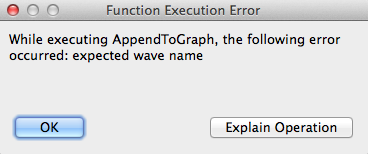
In this example, we tried to pass to the AppendToGraph function a reference to a wave that did not exist. To find the source of the error, you should use Igor's debugger and set it to break on error (see Debugging on Error for details).
Runtime Errors From Built-in Functions
Normally, when an error occurs in a built-in function, the built-in function does not post an error but instead returns 0, NaN or an empty string as the function result. As a debugging aid, you can use the rtFunctionErrors pragma to force Igor to post an error. See The rtFunctionErrors Pragma for details.
Custom Error Handling
Normally when an error occurs, Igor aborts function execution.
Sophisticated programmers may want to detect and deal with runtime errors on their own. See Flow Control for Aborts for details and examples.
Coercion in Functions
The term "coercion" means the conversion of a value from one numeric precision or numeric type to another. Consider this example:
Function foo(awave)
WAVE/C awave
Variable/C var1
var1 = awave[2]*cmplx(2,3)
return real(var1)
End
The parameter declaration tells Igor that awave is expected to be complex. You can pass any kind of wave you like, but the wave's values will be coerced into complex before use. For example, if you pass a real valued integer wave, the value at point index 2 will be converted to double precision and zero will be used for the imaginary part.
Operations in Functions
You can call most operations from user-defined functions. To provide this capability, WaveMetrics had to create special code for each operation. Some operations weren't worth the trouble or could cause problems. If an operation can't be invoked from a function, an error message is displayed when the function is compiled. The operations that can't be called from a function are:
| AppendToLayout | Layout | Modify | OpenProc | |||
| PrintGraphs | Quit | RemoveFromLayout | ||||
| Stack | Tile | |||||
If you need to invoke one of these operations from a user-defined function, use the Execute operation (see The Execute Operation).
While Modify cannot be called from a function, ModifyGraph, ModifyTable, and ModifyLayout operations can.
You can use the NewLayout operation instead of Layout, the AppendLayoutObject operation instead of AppendToLayout, and the RemoveLayoutObjects operation instead of RemoveFromLayout.
External operations implemented by very old XOPs also cannot be called directly from user-defined functions. Again, the solution is to use the Execute operation.
Updates During Function Execution
An update is an action that Igor performs which consists of:
-
Reexecuting formulas for dependent objects whose antecedents have changed (see Dependencies)
-
Redrawing graphs, tables, and Gizmo plots which display waves that have changed
-
Redrawing page layouts containing graphs, tables, Gizmo plots, or annotations that have changed
-
Redrawing windows that have been uncovered
When no procedure is executing, Igor continually checks whether an update is needed and does an update if necessary.
When a user-defined function is executing, Igor does no automatic updates at all. You can force an update by calling the DoUpdate operation. Call DoUpdate if you don't want to wait for the next automatic update which will occur when function execution finishes.
Aborting Functions
There are two ways to prematurely stop procedure execution: a user abort or a programmed abort. Both stop execution of all procedures, no matter how deeply nested.
You can abort function execution by pressing the User Abort Key Combinations or by clicking the Abort button in the status bar. You may need to press the keys down for a while because Igor looks at the keyboard periodically and if you don't press the keys long enough, Igor will not see them.
A user abort does not directly return. Instead it sets a flag that tells Igor to stop loops from looping and then returns using the normal calling chain. For this reason some code will still be executed after an abort but execution should stop quickly. This behavior allows Igor to release any temporary memory allocations it may have made during execution.
A programmed abort occurs during procedure execution according to conditions set by the programmer.
The simplest programmed abort occurs when the Abort operation is executed. Here is an example:
if (numCells > 10)
Abort "Too many cells! Quitting."
endif
// code here doesn't execute if numCells > 10
Other programmed aborts can be triggered using the AbortOnRTE and AbortOnValue flow control keywords. The try-catch-endtry flow control construct can be used for catching and testing for aborts. See Flow Control for Aborts for more details.
If your code uses Igor pre-emptive threads that can run for a long time, you should detect aborts and make your threads quit. See Aborting Threads for details.
Igor Pro 7 Programming Extensions
The following programming features were added in Igor Pro 7. They bring Igor programming closer to the C language. If you use these features, your procedures will not compile in Igor Pro 6.
Double and Complex Variable Types in User-Defined Functions
In Igor Pro 7 or later you can use double and complex in functions as aliases for Variable and Variable/C for parameters and local variables in user-defined functions:
Function foo()
double d = 4
complex c = cmplx(2,3)
Print d,c
End
Integer Variable Types in User-Defined Functions
In Igor Pro 7 or later you can use the integer types int, int64 and uint64 for parameters and local variables in user-defined functions. You can also use int64 and uint64 in structures. See Integer Parameters for details.
Integer Expressions in User-Defined Functions
Prior to Igor Pro 7, all calculations were performed in double-precision floating point. In Igor Pro 7 or later, Igor uses integer calculations when the destination is an integer type. See Expression Evaluation for details.
Inline Parameters in User-Defined Functions
In Igor Pro 7 or later you can declare user-defined functions parameters inline. See Inline Parameters for details.
Line Continuation in User-Defined Functions
In user-defined functions in Igor Pro 7 or later, you can use arbitrarily long expressions by including a line continuation character at the very end of a line. See Line Continuation for details.
Bit Shift Operators in User-Defined Functions
Igor Pro 7 or later supports the bit shift operators << and >> on local variables. See Bit Shift Operators for details.
Increment and Decrement Operators in User-Defined Functions
In a user-defined function in Igor Pro 7 or later, you can use increment and decrement operators on local variables. See Increment and Decrement Operators for details.
Legacy Code Issues
This section discusses changes that have occurred in Igor programming over the years. If you are writing new code, you don't need to be concerned with these issues. If you are working with existing code, you may run into some of them.
If you are just starting to learn Igor programming, you have enough to think about already, so it is a good idea to skip this section. Once you are comfortable with the modern techniques described above, come back and learn about these antiquated techniques.
Old-Style Comments and Compatibility Mode
In Igor Pro 1.00 through 3.00, the comment symbol was the vertical bar (|). Starting with Igor Pro 4.00 vertical bar is used as the bitwise OR operator (see Operators) and the comment symbol is //.
In the unlikely event that you encounter an ancient procedure file that used vertical bar as the comment symbol, you need to replace the vertical bars with //.
From Igor Pro 4.00 through Igor Pro 6.37, there was a compatibility mode that told Igor to accept vertical bar as a comment symbol:
Silent 100 // Enter compatibility mode
Support for this compatibility mode was removed in Igor Pro 7.00.
Text after Flow Control
Prior to Igor Pro 4, Igor ignored any extraneous text after a flow control statement. Such text was an error, but Igor did not detect it.
Igor now checks for extra text after flow control statements. When found, a dialog is presented asking the user if such text should be considered an error or not. The answer lasts for the life of the Igor session.
Because previous versions of Igor ignored this extra text, it may be common for existing procedure files to have this problem. The text may in many cases simply be a typographic error such as an extra closing parenthesis:
if( a==1 ))
In other cases, the programmer may have thought they were creating an elseif construct:
else if( a==2 )
even though the "if(a==2)" part was simply ignored. In some cases this may represent a bug in the programmer's code but most of the time it is asymptomatic.
Global Variables Used By Igor Operations
The section Local Variables Used By Igor Operations explains that certain Igor operations create and set certain special local variables. Very old procedure code expects such variables to be created as global variables and must be rewritten.
Also explained in Local Variables Used By Igor Operations is the fact that some operations, such as CurveFit, look for certain special local variables which modify the behavior of the operations. For historic reasons, operations that look for special variables will look for global variables in the current data folder if the local variable is not found. This behavior is unfortunate and may be removed from Igor some day. New programming should use local variables for this purpose.
Direct Reference To Globals
The section Accessing Global Variables And Waves explains how to access globals from a procedure file. Very old procedure files may attempt to reference globals directly, without the use of WAVE, NVAR, or SVAR statements. This section explains how to update such procedures.
Here are the steps for converting a procedure file to use the runtime lookup for accessing globals:
-
Insert the #pragma rtGlobals=3 statement, with no indentation, at or near the top of the procedure in the file.
-
Click the Compile button to compile the procedures.
-
If the procedures use a direct reference to access a global, Igor will display an error dialog indicating the line on which the error occurred. Add an NVAR, SVAR or WAVE reference.
-
If you encountered an error in step 3, fix it and return to step 2.